我是靠谱客的博主 雪白月饼,这篇文章主要介绍voc数据集格式转换为coco数据集格式+修改xml格式文件voc数据集格式→coco数据集格式修改xml格式文件中部分内容,现在分享给大家,希望可以做个参考。
voc数据集格式转换为coco格式+修改xml格式文件中部分内容
- voc数据集格式→coco数据集格式
- 修改xml格式文件中部分内容
voc数据集格式→coco数据集格式
下面这份代码只需修改文件所在位置xml_path以及生成.json格式的文件所在位置 json_file即可。
import xml.etree.ElementTree as ET
import os
import json

coco = dict()
coco['images'] = []
coco['type'] = 'instances'
coco['annotations'] = []
coco['categories'] = []

category_set = dict()
image_set = set()

category_item_id = -1
image_id = 20180000000
annotation_id = 0


def addCatItem(name):
    global category_item_id
    category_item = dict()
    category_item['supercategory'] = 'none'
    category_item_id += 1
    category_item['id'] = category_item_id
    category_item['name'] = name
    coco['categories'].append(category_item)
    category_set[name] = category_item_id
    return category_item_id


def addImgItem(file_name, size):
    global image_id
    if file_name is None:
        raise Exception('Could not find filename tag in xml file.')
    if size['width'] is None:
        raise Exception('Could not find width tag in xml file.')
    if size['height'] is None:
        raise Exception('Could not find height tag in xml file.')
    image_id += 1
    image_item = dict()
    image_item['id'] = image_id
    image_item['file_name'] = file_name
    image_item['width'] = size['width']
    image_item['height'] = size['height']
    coco['images'].append(image_item)
    image_set.add(file_name)
    return image_id


def addAnnoItem(object_name, image_id, category_id, bbox):
    global annotation_id
    annotation_item = dict()
    annotation_item['segmentation'] = []
    seg = []
    # bbox[] is x,y,w,h
    # left_top
    seg.append(bbox[0])
    seg.append(bbox[1])
    # left_bottom
    seg.append(bbox[0])
    seg.append(bbox[1] + bbox[3])
    # right_bottom
    seg.append(bbox[0] + bbox[2])
    seg.append(bbox[1] + bbox[3])
    # right_top
    seg.append(bbox[0] + bbox[2])
    seg.append(bbox[1])

    annotation_item['segmentation'].append(seg)

    annotation_item['area'] = bbox[2] * bbox[3]
    annotation_item['iscrowd'] = 0
    annotation_item['ignore'] = 0
    annotation_item['image_id'] = image_id
    annotation_item['bbox'] = bbox
    annotation_item['category_id'] = category_id
    annotation_id += 1
    annotation_item['id'] = annotation_id
    coco['annotations'].append(annotation_item)


def parseXmlFiles(xml_path):
    for f in os.listdir(xml_path):
        if not f.endswith('.xml'):
            continue

        bndbox = dict()
        size = dict()
        current_image_id = None
        current_category_id = None
        file_name = None
        size['width'] = None
        size['height'] = None
        size['depth'] = None

        xml_file = os.path.join(xml_path, f)
        print(xml_file)

        tree = ET.parse(xml_file)
        root = tree.getroot()
        if root.tag != 'annotation':
            raise Exception('pascal voc xml root element should be annotation, rather than {}'.format(root.tag))

        # elem is <folder>, <filename>, <size>, <object>
        for elem in root:
            current_parent = elem.tag
            current_sub = None
            object_name = None

            if elem.tag == 'folder':
                continue

            if elem.tag == 'filename':
                file_name = elem.text
                if file_name in category_set:
                    raise Exception('file_name duplicated')

            # add img item only after parse <size> tag
            elif current_image_id is None and file_name is not None and size['width'] is not None:
                if file_name not in image_set:
                    current_image_id = addImgItem(file_name, size)
                    print('add image with {} and {}'.format(file_name, size))
                else:
                    raise Exception('duplicated image: {}'.format(file_name))
                    # subelem is <width>, <height>, <depth>, <name>, <bndbox>
            for subelem in elem:
                bndbox['xmin'] = None
                bndbox['xmax'] = None
                bndbox['ymin'] = None
                bndbox['ymax'] = None

                current_sub = subelem.tag
                if current_parent == 'object' and subelem.tag == 'name':
                    object_name = subelem.text
                    if object_name not in category_set:
                        current_category_id = addCatItem(object_name)
                    else:
                        current_category_id = category_set[object_name]

                elif current_parent == 'size':
                    if size[subelem.tag] is not None:
                        raise Exception('xml structure broken at size tag.')
                    size[subelem.tag] = int(subelem.text)

                # option is <xmin>, <ymin>, <xmax>, <ymax>, when subelem is <bndbox>
                for option in subelem:
                    if current_sub == 'bndbox':
                        if bndbox[option.tag] is not None:
                            raise Exception('xml structure corrupted at bndbox tag.')
                        bndbox[option.tag] = int(option.text)

                # only after parse the <object> tag
                if bndbox['xmin'] is not None:
                    if object_name is None:
                        raise Exception('xml structure broken at bndbox tag')
                    if current_image_id is None:
                        raise Exception('xml structure broken at bndbox tag')
                    if current_category_id is None:
                        raise Exception('xml structure broken at bndbox tag')
                    bbox = []
                    # x
                    bbox.append(bndbox['xmin'])
                    # y
                    bbox.append(bndbox['ymin'])
                    # w
                    bbox.append(bndbox['xmax'] - bndbox['xmin'])
                    # h
                    bbox.append(bndbox['ymax'] - bndbox['ymin'])
                    print('add annotation with {},{},{},{}'.format(object_name, current_image_id, current_category_id,
                                                                   bbox))
                    addAnnoItem(object_name, current_image_id, current_category_id, bbox)


if __name__ == '__main__':
    xml_path = 'F:modelsDETRVOCtest60Annotations'  # 这是xml文件所在的地址
    json_file = './test.json'  # 这是你要生成的json文件
    parseXmlFiles(xml_path)  # 只需要改动这两个参数就行了
    json.dump(coco, open(json_file, 'w'))
顺便附上一份整理数据的代码:
import shutil
root = r"F:modelsDETRouyangDataSets"

def move():
    file_object = open(root + r'ImageSetstest.txt')
    try:
        for line in file_object:
            print(line)
            file = root + '\JPEGImages\' + line.rstrip('n') + '.jpg' #移动文件
            print(file)
            # pic = line.rstrip('n') #移动图片
            shutil.move(file, r"F:modelsDETRouyangDataSetsJPEGImagestest")
    finally:
        file_object.close()

if __name__ == '__main__':
    move()
修改xml格式文件中部分内容
在上面数据转变为所需要的格式之后,便开始了训练,但在训练过程中发现如下的问题:
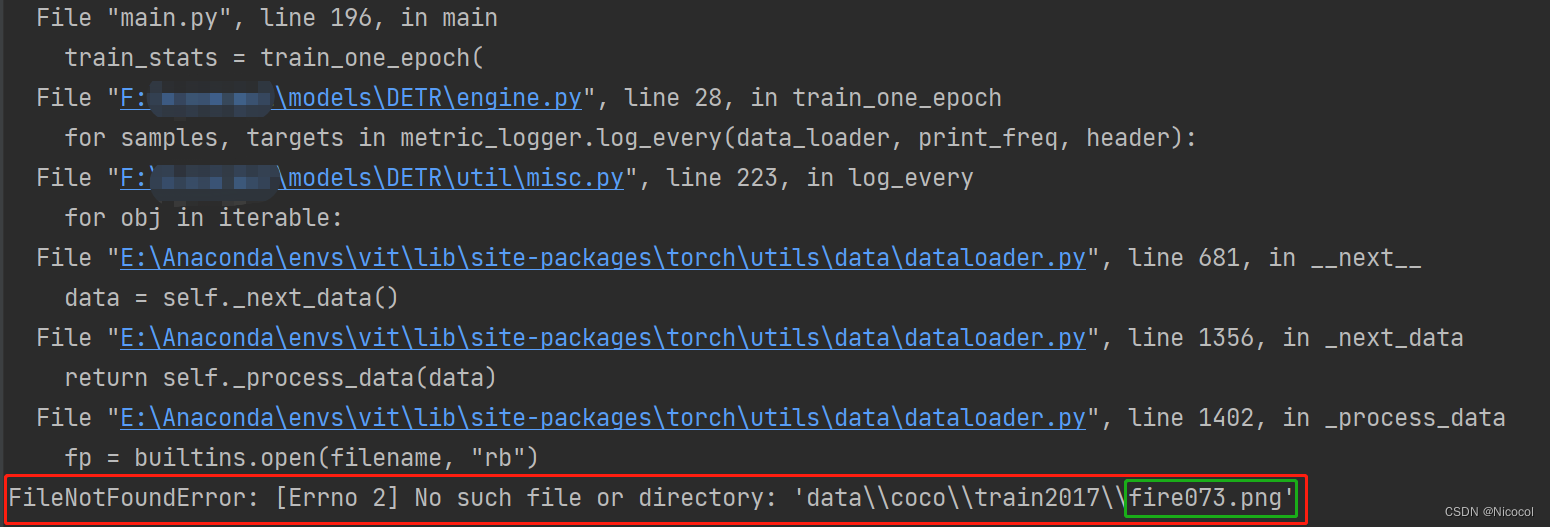
这个问题我的确是查了很久,所用的数据集中并不存在**.png**格式的图片,开始怀疑是不是某一处代码将jpg格式的图片转变为了png格式的,于是去查了dataloader.py,但并没有收获,后面怀疑是否是在voc格式的数据转换为coco格式过程中出现了问题,还是一无所获。
后面想着去看看生成的json文件,发现里面存在很多的png格式的文件名,再去看用于生成json格式的xml文件,果然…里面某些图片为.jpg数据的xml文件中的filename的后缀却为.png。
下面附上修改的代码:
# 此代码用于将生成错误的xml文件中的png转为jpg
# coding=utf-8
import os.path
import xml.dom.minidom

path = r"F:modelsDETRouyangDatasetsVOCtest60Annotations"
files = os.listdir(path)  # 得到文件夹下所有文件名称
s = []
for xmlFile in files:  # 遍历文件夹
    if not os.path.isdir(xmlFile) and xmlFile[-2:] != 'py':  # 判断是否是文件夹,不是文件夹才打开
        print("文件名:"+xmlFile)

        # TODO
        # xml文件读取操作

        # 将获取的xml文件名送入到dom解析
        dom = xml.dom.minidom.parse(os.path.join(path, xmlFile))  ###最核心的部分,路径拼接,输入的是具体路径
        root = dom.documentElement
        # 获取标签对name/pose之间的值
        filename = root.getElementsByTagName('filename')
        # 原始信息
        n0 = filename[0]
        print('原始信息:'+n0.firstChild.data)

        # 修改
        n0.firstChild.data = xmlFile[:-3]+'jpg' #所处理的文件名与xml格式中的filename除后缀外是一样的
        # 打印输出
        print('修改后的filename:'+n0.firstChild.data)

        with open(os.path.join(path, xmlFile), 'w') as fh:
            dom.writexml(fh)
            print('写入ok------------')
原始xml文件:
<?xml version="1.0" ?><annotation>
	<folder>Fire images</folder>
	<filename>0000.png</filename>
	<path>F:DataSetshlw_fire_dataFire images0000.jpg</path>
	<source>
		<database>Unknown</database>
	</source>
	<size>
		<width>490</width>
		<height>367</height>
		<depth>3</depth>
	</size>
	<segmented>0</segmented>
	<object>
		<name>fire</name>
		<pose>Unspecified</pose>
		<truncated>0</truncated>
		<difficult>0</difficult>
		<bndbox>
			<xmin>237</xmin>
			<ymin>82</ymin>
			<xmax>295</xmax>
			<ymax>154</ymax>
		</bndbox>
	</object>
	<object>
		<name>fire</name>
		<pose>Unspecified</pose>
		<truncated>0</truncated>
		<difficult>0</difficult>
		<bndbox>
			<xmin>209</xmin>
			<ymin>208</ymin>
			<xmax>288</xmax>
			<ymax>251</ymax>
		</bndbox>
	</object>
</annotation>
修改后的:

<?xml version="1.0" ?><annotation>
	<folder>Fire images</folder>
	<filename>0000.jpg</filename>
	<path>F:DataSetshlw_fire_dataFire images0000.jpg</path>
	<source>
		<database>Unknown</database>
	</source>
	<size>
		<width>490</width>
		<height>367</height>
		<depth>3</depth>
	</size>
	<segmented>0</segmented>
	<object>
		<name>fire</name>
		<pose>Unspecified</pose>
		<truncated>0</truncated>
		<difficult>0</difficult>
		<bndbox>
			<xmin>237</xmin>
			<ymin>82</ymin>
			<xmax>295</xmax>
			<ymax>154</ymax>
		</bndbox>
	</object>
	<object>
		<name>fire</name>
		<pose>Unspecified</pose>
		<truncated>0</truncated>
		<difficult>0</difficult>
		<bndbox>
			<xmin>209</xmin>
			<ymin>208</ymin>
			<xmax>288</xmax>
			<ymax>251</ymax>
		</bndbox>
	</object>
</annotation>
主要参考博客:
python批量修改xml属性
【学习笔记】使用python批量读取并修改xml文件
Python将voc数据格式转化为coco数据格式
最后
以上就是雪白月饼最近收集整理的关于voc数据集格式转换为coco数据集格式+修改xml格式文件voc数据集格式→coco数据集格式修改xml格式文件中部分内容的全部内容,更多相关voc数据集格式转换为coco数据集格式+修改xml格式文件voc数据集格式→coco数据集格式修改xml格式文件中部分内容内容请搜索靠谱客的其他文章。
本图文内容来源于网友提供,作为学习参考使用,或来自网络收集整理,版权属于原作者所有。








发表评论 取消回复