方法一:
可以通过将imshow函数属性”Border’的值设置为’tight’,而imshow的默认值为’loose’,然后通过figure1-文件-另存为的方式将图片进行保存:
imshow(img,'Border','tight');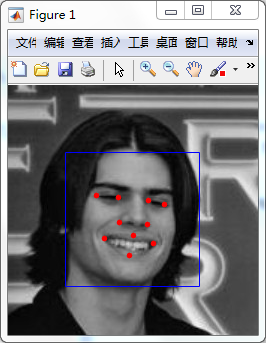
方法二:
imshow(img,'Border','tight');
set(gcf,'color','white','paperpositionmode','auto');
saveas(gcf,'exprimentLightBundles.eps','psc2');
%或者
imshow(img,'Border','tight');
set(gcf,'color','white','paperpositionmode','auto');
saveas(gcf,'example','bmp');%png等等
最后
以上就是腼腆果汁最近收集整理的关于Matlab如何保存被plot的图像的全部内容,更多相关Matlab如何保存被plot内容请搜索靠谱客的其他文章。
本图文内容来源于网友提供,作为学习参考使用,或来自网络收集整理,版权属于原作者所有。

![matlab图片rectangle,科学网—[转载]Matlab中对图像应用plot或者rectangle后的图像保存问题 - 范凯波的博文...](https://www.shuijiaxian.com/files_image/reation/bcimg27.png)





![matlab获取图像像素坐标[已验证]](https://www.shuijiaxian.com/files_image/reation/bcimg6.png)
发表评论 取消回复