场景如下
1、编写css和html代码如下
<div class="" style="padding:10px;">
    <div style="display:inline-block;">
        <div style="float:left;height:35px;line-height:35px;padding:0 10px;background:#ccc;border:1px solid #ccc;">
            <label>one</label>
        </div>
        <div style="float:left;height:35px;line-height:35px;padding:0 10px;background:#eee;border:1px solid #ccc;">
            <span class="">two</span>
        </div>
    </div>

    <div style="display:inline-block;height:35px;line-height:35px;padding:0 10px;border:1px solid #0ccdff;background:#0ccdff;color:#fff;cursor:pointer;">
        <span>按钮</span>
    </div>
</div>
2、页面效果,两个行内元素出现错位

3、解决方法:使用垂直对齐的样式,vertical-align:middle
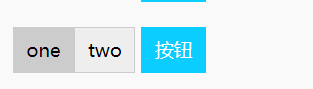

4、知道解决方法,但也要知道为什么会出现,这样能够加深理解,快速解决问题
1)把第一个inline-block内部div的float浮动去掉,效果如下
第二个inline-block会和第一个inline-block内部的最后一个div对齐
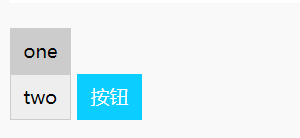
猜想,如果我只给第二个inline-block设置垂直水平顶部对齐vertical-align:top,那么有按钮则会和one对齐
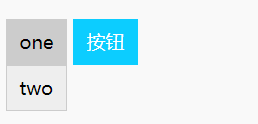
5、因此,以上解决方法,只需要给按钮这个div设置垂直水平顶部对齐vertical-align:top样式即可
    <div class="" style="padding:10px;">
        <div style="display:inline-block;">
            <div style="float:left;height:35px;line-height:35px;padding:0 10px;background:#ccc;border:1px solid #ccc;">
                <label>one</label>
            </div>
            <div style="float:left;height:35px;line-height:35px;padding:0 10px;background:#eee;border:1px solid #ccc;">
                <span class="">two</span>
            </div>
        </div>

        <div style="display:inline-block;height:35px;line-height:35px;padding:0 10px;border:1px solid #0ccdff;background:#0ccdff;color:#fff;cursor:pointer;vertical-align: top;">
            <span>按钮</span>
        </div>
    </div>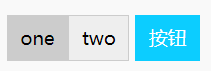
以上仅为个人分析所得结果,有不对的地方,往高手指教!
最后
以上就是粗暴薯片最近收集整理的关于【小5聊】css布局html页面之inline-block布局错位解决方法的全部内容,更多相关【小5聊】css布局html页面之inline-block布局错位解决方法内容请搜索靠谱客的其他文章。
本图文内容来源于网友提供,作为学习参考使用,或来自网络收集整理,版权属于原作者所有。








发表评论 取消回复