做动画效果
鼠标放button上面,字段变大
在故事板里创建一个动画, 在0-0.2s内,字体变大
  <Window.Resources>

        <Style x:Key="defaultstyle" TargetType="Button"  >
            <Setter Property="FontSize" Value="20"></Setter>
            <Setter Property="Width" Value= "200" ></Setter>
            <Style.Triggers>
                <EventTrigger RoutedEvent="Mouse.MouseEnter">
                    <EventTrigger.Actions>
                        <BeginStoryboard>
                            <Storyboard>
                                <DoubleAnimation Duration="0:0:0.2" Storyboard.TargetProperty="FontSize" To="30">

                                </DoubleAnimation>
                            </Storyboard>
                        </BeginStoryboard>
                    </EventTrigger.Actions>
                </EventTrigger>
            </Style.Triggers>


        </Style>
    </Window.Resources>

    <Grid>
        <StackPanel>
            <Button Style="{StaticResource defaultstyle}" Content="Button1" />
            <Button Style="{StaticResource defaultstyle}" Content="Button2"  />
            <Button Style="{StaticResource defaultstyle}" Content="Button3"   />
        </StackPanel>
    </Grid>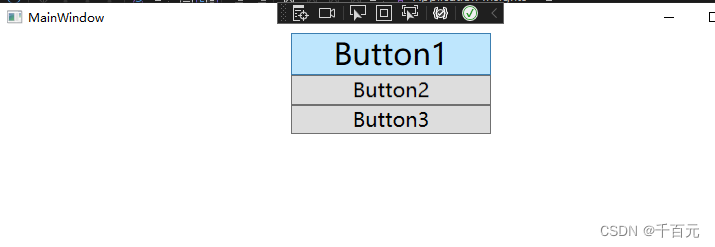
最后
以上就是漂亮煎蛋最近收集整理的关于wpf 事件触发器的全部内容,更多相关wpf内容请搜索靠谱客的其他文章。
本图文内容来源于网友提供,作为学习参考使用,或来自网络收集整理,版权属于原作者所有。








发表评论 取消回复