1、浏览器往Action传递参数:
在Action中设置属性,并为属性设置get/set方法。传递参数时按照属性的名字赋值即可。如xxx?name=aa
取值用request.getPrameters("属性名“);
public class UserAction { private String name; private User user; public String userAdd() { System.out.print(user.getName()); System.out.print(name); return "success"; } public String getName() { return name; } public void setName(String name) { this.name = name; } public User getUser() { return user; } public void setUser(User user) { this.user = user; } }
注:struts2不会使用单例模式,因此每次的请求都是new 一个新对象。
2、Action 往浏览器界面传递参数:
方式有三种:
1)种:直接给Action 属性(有get/set方法)赋值 ,JSP中用
- <s:property value="OGNL表达式"/> 取值,注意返回结果类型为forward
例如:
- <s:property value="name"/> //action类中普通属性
- <s:property value="user.name"/> //action类中对象属性
2)种:通过ActionContext传值,在Action中所调用的方法中加入:
-
ActionContext.getContext().put("key", "value");
JSP中用
- <s:property value="#key"/>取值
3)种:通过request、session 传值。Action方法中通过取得HttpServletRequest 、HttpSession 和 Map对象设置值,
例如:
-
ServletActionContext.getRequest().setAttribute("arg0", "value"); ServletActionContext.getRequest().getSession().setAttribute("arg0", "value"); ActionContext.getContext().getSession().put("key", "value");
jsp页面通过:
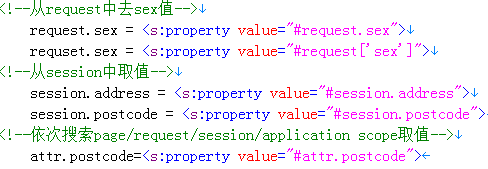
转载于:https://www.cnblogs.com/hefeisf/p/4687802.html
最后
以上就是饱满手套最近收集整理的关于struts2的action与jsp之间传递参数的全部内容,更多相关struts2内容请搜索靠谱客的其他文章。
本图文内容来源于网友提供,作为学习参考使用,或来自网络收集整理,版权属于原作者所有。








发表评论 取消回复