背景
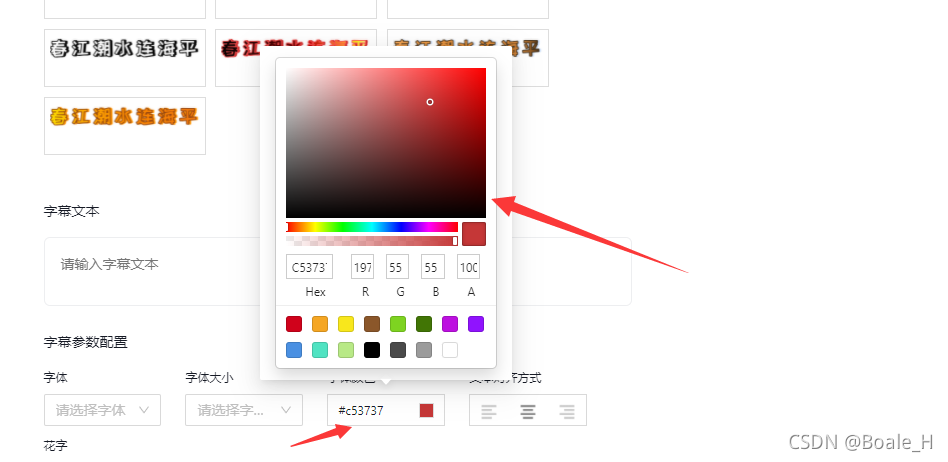
我们可以通过react-color实现前端界面的取色器,效果如下图所示:
安装
npm i react-color -S
使用
import React, { Component, Fragment, createRef } from 'react';
import { Popover } from 'antd';
import { SketchPicker } from 'react-color';

type StateType = {
  subtitleColor: string;
};
type PropType = {
  [propName: string]: any;
};
interface HandleCreateVideoByHotNews {
  state: StateType;
  props: PropType;
}

class HandleCreateVideoByHotNews extends Component {
  constructor(props: any) {
    super(props);
    this.state = {
      subtitleColor: '#FFF',
    }
  }

  // 修改字幕字体颜色
  private setSubtitleFontColor = (e: any): void => {
    console.log(e);
    this.setState({
      subtitleColor: e.hex,
    });
  }

  render() {
    const { subtitleColor } = this.state;

    return (
      <Popover
        content={<SketchPicker color={subtitleColor}
        onChange={(e) => {this.setSubtitleFontColor(e)}}
        onChangeComplete={(e) => {this.setSubtitleFontColor(e)}} />}
        trigger="click"
      >
        <div className="create-hotnews-video-popup-operate-item-titleset-item-operate font-color-set">
          <div className="font-color-set-value">{subtitleColor}</div>
          <div className="font-color-set-show" style={{backgroundColor: subtitleColor}}></div>
        </div>
      </Popover>
    )
  }
}

export default HandleCreateVideoByHotNews;
到此这篇关于使用react-color实现前端取色器的文章就介绍到这了,更多相关ct-color前端取色器内容请搜索靠谱客以前的文章或继续浏览下面的相关文章希望大家以后多多支持靠谱客!
最后
以上就是腼腆手套最近收集整理的关于使用react-color实现前端取色器的方法的全部内容,更多相关使用react-color实现前端取色器内容请搜索靠谱客的其他文章。
本图文内容来源于网友提供,作为学习参考使用,或来自网络收集整理,版权属于原作者所有。








发表评论 取消回复