此博客主要为记录解决:“No dashboards are active for the current data set”的问题
说白了核心问题是出在 :生成tensorboard的event文件目录没有使用正确
参考文章:https://blog.csdn.net/sinat_20729643/article/details/78683677
环境:anaconda+jupyter-notebook
一.命令版
writer = tf.summary.FileWriter('./log', sess.graph)
'./log' 就是我们生成event文件的位置,这里是在ipynb同一个文件夹内生成log文件夹,里面有生成好的event文件
比如,event文件位置是在:C:UsersAdministratorDesktopTestlog
那么我在anaconda prompt里运行的语句就是:tensorboard --logdir=C:UsersAdministratorDesktopTest
所以位置对应很重要!!!!!!然后生成网址,开始看 OVER
二.jupyter-tensorboard版
pip install jupyter-tensorboard :让你直接在jupyter notebook里就可以看tensorboard
writer = tf.summary.FileWriter('./log', sess.graph)
同上,我已经在log文件夹里生成好了event
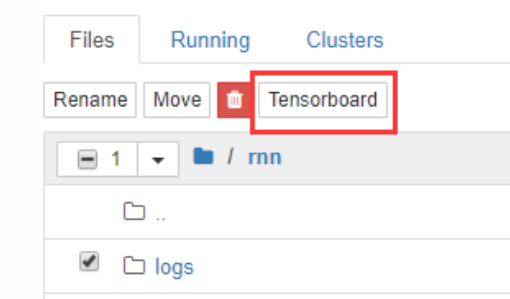
然后在jupyter-notebook目录下,选中log文件夹,然后点下图红框位置,OK~~大功告成
最后
以上就是醉熏煎饼最近收集整理的关于Tensorboard的使用之---命令版+jupyter-tensorboard版的全部内容,更多相关Tensorboard内容请搜索靠谱客的其他文章。








发表评论 取消回复