1. 计划任务设置(执行身份, 权限等)
以开机脚本为例
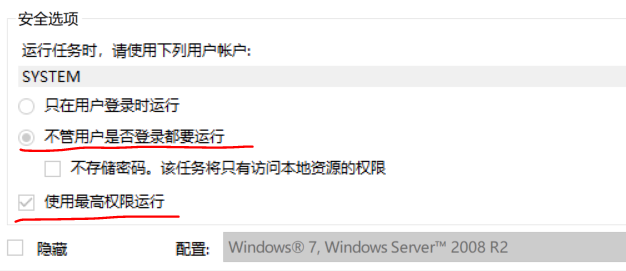
只需要勾选'不管是否登录都要运行'及'最高权限运行'
触发器:

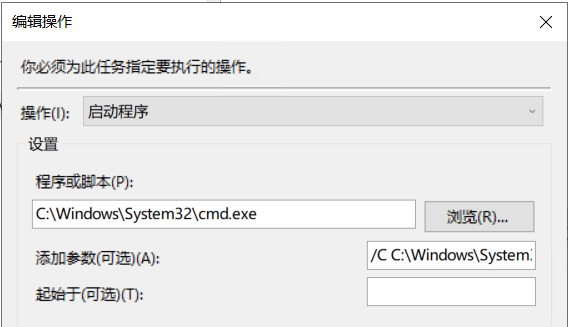
操作:
思路: cmd.exe 调用 powershell.exe 再加参数指定 xxx.ps1 文件
启动程序: C:WindowsSystem32cmd.exe
若想正常的执行ps1脚本, 需要proper powershell.exe 的参数
-File 参数 脚本完全路径 String类型
-ExecutionPolicy 执行策略 可选值 Restricted / AllSigned / RemoteSigned / Unrestricted / Bypass / Undefined
-Noprofile 配置文件
-NonInteractive 不交互
-NoLogo No Copyright 提醒
添加参数: /C C:WindowsSystem32WindowsPowerShellv1.0powershell.exe -NoProfile -NonInteractive -NoLogo -ExecutionPolicy Unrestricted -File "C:ProgramDataxxxx.ps1"
cmd /c 执行完关闭, cmd /k 执行完保留
或者是
程序或脚本:
C:WindowsSystem32WindowsPowerShellv1.0powershell.exe
参数:-windowstyle hidden -NoProfile -NonInteractive -NoLogo -ExecutionPolicy Unrestricted -File "C:tempairwatchChangeDesktop.ps1"
最后
以上就是幽默帅哥最近收集整理的关于Windows Powershell 计划任务的全部内容,更多相关Windows内容请搜索靠谱客的其他文章。








发表评论 取消回复