一:前期准备
1.1:企业号注册 https://qy.weixin.qq.com/
微信调用接口说明 http://qydev.weixin.qq.com/wiki/index.php?title=%E9%A6%96%E9%A1%B5
微信企业号接口调试地址 http://qydev.weixin.qq.com/debug
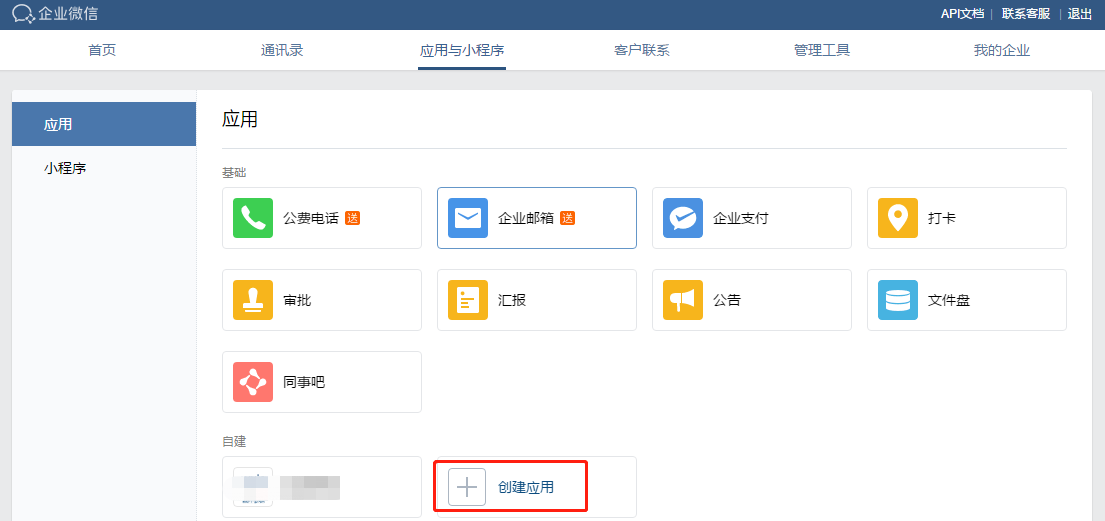
1.3:获取企业ID

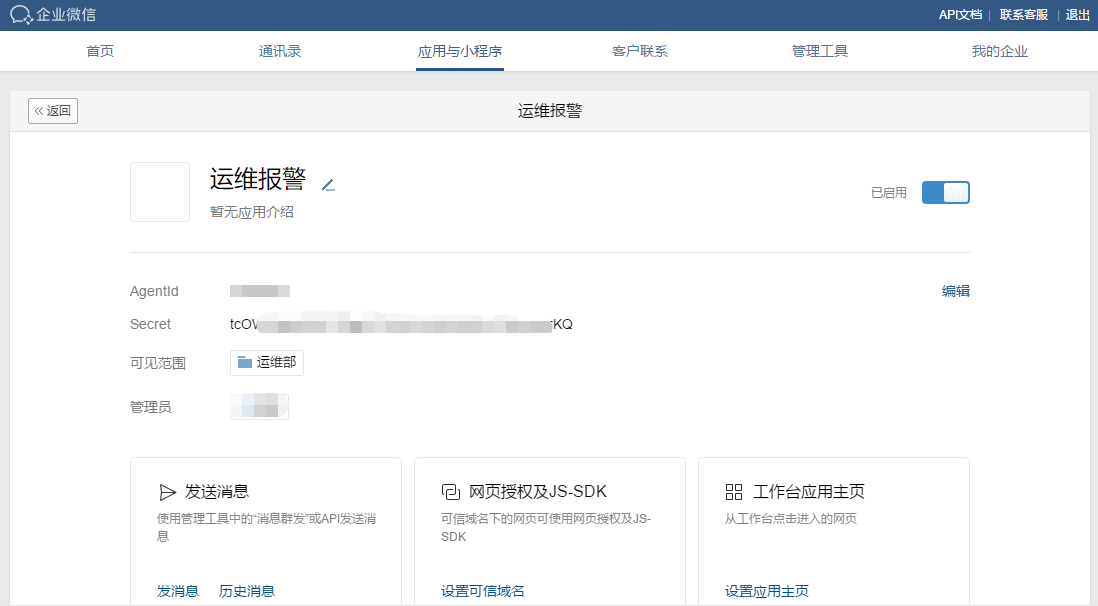
1.4:获取Secret
1.5:获取token
https://work.weixin.qq.com/api/devtools/devtool.php

1.6:通过命令行获取:(此处有问题可忽略)
/usr/bin/curl -s -G https://qyapi.weixin.qq.com/cgi-bin/gettoken?corpid=xxxx&corpsecret=xxxx |awk -F":'{print $4}'|awk -F" '{print $2}'
二:安装python3
2.1:安装openssl-devel依赖,让python支持https
yum install -y openssl-devel
yum -y install zlib-devel bzip2-devel openssl-devel ncurses-devel sqlite-devel readline-devel tk-devel gdbm-devel db4-devel libpcap-devel xz-devel libffi-devel gcc gcc-c++
2.2:下载并安装python3
wget https://www.python.org/ftp/python/3.7.2/Python-3.7.2.tgz
解压:
tar -zxvf Python-3.7.2.tgz
安装:
cp -r Python-3.7.2 /usr/local/python3
cd /usr/local/python3
./configure --prefix=/usr/local/python3
运行结果
creating Modules/Setup
creating Modules/Setup.local
creating Makefile
If you want a release build with all stable optimizations active (PGO, etc),
please run ./configure --enable-optimizations
make && make install
Looking in links: /tmp/tmp75uuoqa7
Collecting setuptools
Collecting pip
Installing collected packages: setuptools, pip
Successfully installed pip-18.1 setuptools-40.6.2
2.3:创建python3的软链接
ln -s /usr/local/python3/bin/python3 /usr/bin/python3
测试:
cd /
python -V
python3 -V
[root@zabbix /]# python -V
Python 2.7.5
[root@zabbix /]# python3 -V
Python 3.7.2
[root@zabbix /]# cd /usr/local/python3/
[root@zabbix python3]# ll
总用量 0
drwxr-xr-x 2 root root 295 2月
14 11:13 bin
drwxr-xr-x 3 root root
24 2月
14 11:13 include
drwxr-xr-x 4 root root
63 2月
14 11:13 lib
drwxr-xr-x 3 root root
17 2月
14 11:13 share
[root@zabbix python3]# cd bin
[root@zabbix bin]# ll
总用量 27336
lrwxrwxrwx 1 root root
8 2月
14 11:13 2to3 -> 2to3-3.7
-rwxr-xr-x 1 root root
109 2月
14 11:13 2to3-3.7
-rwxr-xr-x 1 root root
250 2月
14 11:13 easy_install-3.7
lrwxrwxrwx 1 root root
7 2月
14 11:13 idle3 -> idle3.7
-rwxr-xr-x 1 root root
107 2月
14 11:13 idle3.7
-rwxr-xr-x 1 root root
232 2月
14 11:13 pip3
-rwxr-xr-x 1 root root
232 2月
14 11:13 pip3.7
lrwxrwxrwx 1 root root
8 2月
14 11:13 pydoc3 -> pydoc3.7
-rwxr-xr-x 1 root root
92 2月
14 11:13 pydoc3.7
lrwxrwxrwx 1 root root
9 2月
14 11:13 python3 -> python3.7
-rwxr-xr-x 2 root root 13979384 2月
14 11:12 python3.7
lrwxrwxrwx 1 root root
17 2月
14 11:13 python3.7-config -> python3.7m-config
-rwxr-xr-x 2 root root 13979384 2月
14 11:12 python3.7m
-rwxr-xr-x 1 root root
3105 2月
14 11:13 python3.7m-config
lrwxrwxrwx 1 root root
16 2月
14 11:13 python3-config -> python3.7-config
lrwxrwxrwx 1 root root
10 2月
14 11:13 pyvenv -> pyvenv-3.7
-rwxr-xr-x 1 root root
449 2月
14 11:13 pyvenv-3.7
[root@zabbix bin]#
2.4:安装之后脚本要用到的python库
/usr/local/python3/bin/pip3 install requests
[root@zabbix zm]# /usr/local/python3/bin/pip3 install requests
Collecting requests
Downloading https://files.pythonhosted.org/packages/7d/e3/20f3d364d6c8e5d2353c72a67778eb189176f08e873c9900e10c0287b84b/requests-2.21.0-py2.py3-none-any.whl (57kB)
100% |████████████████████████████████| 61kB 238kB/s
Collecting idna<2.9,>=2.5 (from requests)
Downloading https://files.pythonhosted.org/packages/14/2c/cd551d81dbe15200be1cf41cd03869a46fe7226e7450af7a6545bfc474c9/idna-2.8-py2.py3-none-any.whl (58kB)
100% |████████████████████████████████| 61kB 16.9MB/s
Collecting chardet<3.1.0,>=3.0.2 (from requests)
Downloading https://files.pythonhosted.org/packages/bc/a9/01ffebfb562e4274b6487b4bb1ddec7ca55ec7510b22e4c51f14098443b8/chardet-3.0.4-py2.py3-none-any.whl (133kB)
100% |████████████████████████████████| 143kB 734kB/s
Collecting urllib3<1.25,>=1.21.1 (from requests)
Downloading https://files.pythonhosted.org/packages/62/00/ee1d7de624db8ba7090d1226aebefab96a2c71cd5cfa7629d6ad3f61b79e/urllib3-1.24.1-py2.py3-none-any.whl (118kB)
100% |████████████████████████████████| 122kB 16.4MB/s
Collecting certifi>=2017.4.17 (from requests)
Downloading https://files.pythonhosted.org/packages/9f/e0/accfc1b56b57e9750eba272e24c4dddeac86852c2bebd1236674d7887e8a/certifi-2018.11.29-py2.py3-none-any.whl (154kB)
100% |████████████████████████████████| 163kB 11.0MB/s
Installing collected packages: idna, chardet, urllib3, certifi, requests
Successfully installed certifi-2018.11.29 chardet-3.0.4 idna-2.8 requests-2.21.0 urllib3-1.24.1
You are using pip version 18.1, however version 19.0.2 is available.
You should consider upgrading via the 'pip install --upgrade pip' command.
[root@zabbix zm]# pip install --upgrade pip
Collecting pip
Downloading https://files.pythonhosted.org/packages/d7/41/34dd96bd33958e52cb4da2f1bf0818e396514fd4f4725a79199564cd0c20/pip-19.0.2-py2.py3-none-any.whl (1.4MB)
100% |████████████████████████████████| 1.4MB 283kB/s
Installing collected packages: pip
Found existing installation: pip 18.1
Uninstalling pip-18.1:
Successfully uninstalled pip-18.1
Successfully installed pip-19.0.2
[root@zabbix zm]# pip -V
pip 19.0.2 from /usr/lib/python2.7/site-packages/pip (python 2.7)
有报错:
You are using pip version 18.1, however version 19.0.2 is available.
You should consider upgrading via the 'pip install --upgrade pip' command.
执行:
pip install --upgrade pip
pip3 install --upgrade pip
三:编辑zabbix报警脚本:
3.1:查看zabbix配置文件:
vim /etc/zabbix/zabbix_server.conf
查找如下内容:
AlertScriptsPath=/usr/lib/zabbix/alertscripts
进入zabbix脚本目录:
cd /usr/lib/zabbix/alertscripts/
3.2:新建zabbix脚本文件:
vim sendweixin.py
#!/usr/local/python3/bin/python3
# -*- coding:utf-8 -*-
import requests
import json
import sys
# 企业号及应用相关信息
corp_id = 'xxxxxxx'
corp_secret = 'xxxxxxx'
agent_id = xxxxxx
# 存放access_token文件路径
file_path = '/tmp/access_token.log'
def get_access_token_from_file():
try:
f = open(file_path,'r+')
this_access_token = f.read()
print('get success %s' % this_access_token)
f.close()
return this_access_token
except Exception as e:
print(e)
# 获取token函数,文本里记录的token失效时调用
def get_access_token():
get_token_url = 'https://qyapi.weixin.qq.com/cgi-bin/gettoken?corpid=%s&corpsecret=%s' % (corp_id, corp_secret)
print(get_token_url)
r = requests.get(get_token_url)
request_json = r.json()
this_access_token = request_json['access_token']
print(this_access_token)
r.close()
# 把获取到的access_token写入文本
try:
f = open(file_path,'w+')
f.write(this_access_token)
f.close()
except Exception as e:
print(e)
# 返回获取到的access_token值
return this_access_token
# snedMessage
# 死循环,直到消息成功发送
flag = True
while(flag):
# 从文本获取access_token
access_token = get_access_token_from_file()
try:
to_user = '@all'
message = sys.argv[3]
send_message_url = 'https://qyapi.weixin.qq.com/cgi-bin/message/send?access_token=%s' % access_token
print(send_message_url)
message_params = {
"touser":to_user,
"msgtype":"text",
"agentid":agent_id,
"text":{
"content" : message
},
"safe":0
}
r = requests.post(send_message_url, data=json.dumps(message_params))
print('post success %s ' % r.text)
# 判断是否发送成功,如不成功则跑出异常,让其执行异常处理里的函数
request_json = r.json()
errmsg = request_json['errmsg']
if errmsg != 'ok': raise
# 消息成功发送,停止死循环
flag = False
except Exception as e:
print(e)
access_token = get_access_token()
还未验证成功!!!
感谢:
微信:
http://www.ttlsa.com/zabbix/use-wechat-send-zabbix-msg/
https://www.cnblogs.com/lemon-le/p/7204944.html
https://www.cnblogs.com/kumarhua/p/7645399.html
python:
https://www.cnblogs.com/xiaoerjun/p/9837029.html
https://www.cnblogs.com/JahanGu/p/7452527.html
https://www.cnblogs.com/dongml/p/8719421.html
转载于:https://www.cnblogs.com/jackyzm/p/10370356.html
最后
以上就是潇洒大侠最近收集整理的关于Zabbix4.0报警配置-企业微信报警的全部内容,更多相关Zabbix4内容请搜索靠谱客的其他文章。








发表评论 取消回复