开发工具Eclipse3.20+MyEclipse
struts-config.xml内容如下:
 <?
xml version="1.0" encoding="UTF-8"
?>
<!
DOCTYPE struts-config PUBLIC "-//Apache Software Foundation//DTD Struts Configuration 1.1//EN" "http://jakarta.apache.org/struts/dtds/struts-config_1_1.dtd"
>
<
struts-config
>
<
data-sources
/>
<
form-beans
>
<
form-bean
name
="upfileForm"
type
="com.form.UpfileForm"
/>
</
form-beans
>
<
global-exceptions
/>
<
global-forwards
/>
<
action-mappings
>
<
action
attribute
="upfileForm"
//不清楚作用?? input
="/upfile.jsp"
name
="upfileForm"
path
="/upfile"
scope
="request"
type
="com.action.UpfileAction"
>
<
forward
name
="success"
path
="/upfileSuccess.jsp"
/>
<
forward
name
="failure"
path
="/upfile.jsp"
/>
</
action
>
</
action-mappings
>
<
message-resources
parameter
="com.ApplicationResources"
/>
</
struts-config
>
<?
xml version="1.0" encoding="UTF-8"
?>
<!
DOCTYPE struts-config PUBLIC "-//Apache Software Foundation//DTD Struts Configuration 1.1//EN" "http://jakarta.apache.org/struts/dtds/struts-config_1_1.dtd"
>
<
struts-config
>
<
data-sources
/>
<
form-beans
>
<
form-bean
name
="upfileForm"
type
="com.form.UpfileForm"
/>
</
form-beans
>
<
global-exceptions
/>
<
global-forwards
/>
<
action-mappings
>
<
action
attribute
="upfileForm"
//不清楚作用?? input
="/upfile.jsp"
name
="upfileForm"
path
="/upfile"
scope
="request"
type
="com.action.UpfileAction"
>
<
forward
name
="success"
path
="/upfileSuccess.jsp"
/>
<
forward
name
="failure"
path
="/upfile.jsp"
/>
</
action
>
</
action-mappings
>
<
message-resources
parameter
="com.ApplicationResources"
/>
</
struts-config
>
形成图像如下: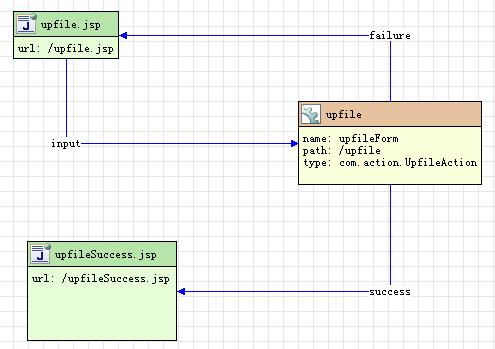
意义如下:
上传成功---------com.action.UpfileFileAction------------------->upfileSuccess.jsp
上传失败----------------------------->upfile.jsp(即返回上传页面)
其中com.action.UpfileFileAction代码如下:

 /**/
/*
/**/
/* * Generated by MyEclipse Struts * Template path: templates/java/JavaClass.vtl
 */
package
com.action;
import
javax.servlet.http.HttpServletRequest;
import
javax.servlet.http.HttpServletResponse;
import
org.apache.struts.action.Action;
import
org.apache.struts.action.ActionForm;
import
org.apache.struts.action.ActionForward;
import
org.apache.struts.action.ActionMapping;
import
com.form.UpfileForm;
//手动添加包
import
org.apache.struts.upload.FormFile;
import
java.io.
*
;
/** */
/** * MyEclipse Struts Creation date: 05-11-2007 * * XDoclet definition: * * @struts.action path="/upfile" name="upfileForm" input="/upfile.jsp" * scope="request" validate="true" */
public
class
UpfileAction
extends
Action
...
{
*/
package
com.action;
import
javax.servlet.http.HttpServletRequest;
import
javax.servlet.http.HttpServletResponse;
import
org.apache.struts.action.Action;
import
org.apache.struts.action.ActionForm;
import
org.apache.struts.action.ActionForward;
import
org.apache.struts.action.ActionMapping;
import
com.form.UpfileForm;
//手动添加包
import
org.apache.struts.upload.FormFile;
import
java.io.
*
;
/** */
/** * MyEclipse Struts Creation date: 05-11-2007 * * XDoclet definition: * * @struts.action path="/upfile" name="upfileForm" input="/upfile.jsp" * scope="request" validate="true" */
public
class
UpfileAction
extends
Action
...
{
 /**//* * Generated Methods
 */ /** *//** * Method execute * * @param mapping * @param form * @param request * @param response * @return ActionForward */ public ActionForward execute(ActionMapping mapping, ActionForm form, HttpServletRequest request, HttpServletResponse response) ...{ UpfileForm upfileForm = (UpfileForm) form; // TODO Auto-generated // FormFile file1 = upfileForm.getTheFile1();// 取得上传的文件 // 上传 try ...{ // 文件大小 String fileSize = Integer.toString(file1.getFileSize()) + "字节"; upfileForm.setFileSize(fileSize); /**//* * 取当前系统路径(其中S_Upfile为当前context) */ String filePath = this.getServlet().getServletContext() .getRealPath("/"); System.out.print("当前系统路径"+filePath);//D:/tomcat5/webapps/S_Upfile // 上传文件1 InputStream stream = file1.getInputStream();// 把文件读入 /**//* * 建立一个上传文件的输出流 如果是linux系统请把UploadFiles后的"//"换成"/",应该有更通用的方法,请大家帮忙啊 */ //D:/Tomcat5/webapps/S_Upfile/UploadFiles/XX.JPG String fileName = filePath + "UploadFiles/" + file1.getFileName(); upfileForm.setFileName(fileName);// 这里曾经出现过莫名奇妙的错误,出现“UploadFiles访问被拒绝” OutputStream bos = new FileOutputStream(fileName); int bytesRead = 0; byte[] buffer = new byte[8192]; while ((bytesRead = stream.read(buffer, 0, 8192)) != -1) ...{ bos.write(buffer, 0, bytesRead);// 将文件写入服务器 } bos.close(); stream.close(); } catch (Exception e) ...{ System.err.print(e);// 输出至控制台 // throw new RuntimeException(e.getMessage()); return mapping.findForward("failure"); } return mapping.findForward("success"); }}
上传页面upfile.jsp如下(注意:要有enctype="multipart/form-data" )
<%
...
@ page language="java" pageEncoding="gb2312"
%>
<%
...
@ taglib uri="http://jakarta.apache.org/struts/tags-bean" prefix="bean"
%>
<%
...
@ taglib uri="http://jakarta.apache.org/struts/tags-html" prefix="html"
%>
<
html
>
<
head
>
<
title
>
用Struts上传文件
</
title
>
</
head
>
<
body
>
<
h1
>
用Struts上传文件
</
h1
>
<
html:errors
/>
<
html:form
action
="/upfile"
enctype
="multipart/form-data"
method
="post"
>
文件1 :
<
html:file
property
="theFile1"
/>
<
html:errors
property
="theFile1"
/>
<
br
/>
<
html:submit
/>
<
html:cancel
/>
</
html:form
>
</
body
>
</
html
>
与其相关的bean,UpfileForm为:
/**/
/* * Generated by MyEclipse Struts * Template path: templates/java/JavaClass.vtl */
package
com.form;
import
javax.servlet.http.HttpServletRequest;
import
org.apache.struts.action.ActionForm;
import
org.apache.struts.action.ActionMapping;
//
import
org.apache.struts.action.ActionMessage;
import
org.apache.struts.action.ActionError;
import
org.apache.struts.action.ActionMessages;
import
org.apache.struts.action.ActionErrors;
//
import
org.apache.struts.upload.FormFile;
import
org.apache.struts.upload.MultipartRequestHandler;
/** */
/** * MyEclipse Struts Creation date: 05-11-2007 * * XDoclet definition: * * @struts.form name="upfileForm" */
public
class
UpfileForm
extends
ActionForm
...
{ /**//* * Generated fields */ /** *//** theFile1 property */ private FormFile theFile1=null; /** *//** theFile2 property */ private String fileName;// 用来存储上传文件所在的目录 private String fileSize; /**//* * Generated Methods */ public ActionErrors validate(ActionMapping mapping, HttpServletRequest request) ...{ // 初始化一个ActionErrors对象 ActionErrors errors = new ActionErrors(); if(theFile1==null)...{ //本意是防止未有添加任何文件就上传,但似乎没有用,希望高手来解决 errors.add(ActionMessages.GLOBAL_MESSAGE, new ActionError( "theFile1")); } //可能是防止路径太深(来源与http://dev.csdn.net/article/50/50395.shtm) Boolean maxLengthExceeded = (Boolean) request .getAttribute(MultipartRequestHandler.ATTRIBUTE_MAX_LENGTH_EXCEEDED); if ((maxLengthExceeded != null) && (maxLengthExceeded.booleanValue())) ...{ //向errors添加第1个错误 errors.add(ActionMessages.GLOBAL_MESSAGE, new ActionError( "maxLengthExceeded")); } //errors.add(ActionMessages.GLOBAL_MESSAGE, new ActionError("error.null")); return errors;// 如果errors不为空,Struts框架就会将请求发会页面 } public FormFile getTheFile1() ...{ return theFile1; } public void setTheFile1(FormFile theFile1) ...{ this.theFile1 = theFile1; } // 这里必须是public否则将会出现“不可视”的错误 public String getFileName() ...{ return fileName; } public void setFileName(String fileName) ...{ this.fileName = fileName; } public String getFileSize() ...{ return fileSize; } public void setFileSize(String fileSize) ...{ this.fileSize = fileSize; }}
上传成功后转入upfileSuccess.jsp的代码如下:
<%
@ page language
=
"
java
"
pageEncoding
=
"
gb2312
"
%>
<% @ taglib uri = " http://jakarta.apache.org/struts/tags-bean " prefix = " bean " %>
<% @ taglib uri = " http://jakarta.apache.org/struts/tags-html " prefix = " html " %>
<% @ taglib uri = " http://jakarta.apache.org/struts/tags-logic " prefix = " logic " %>
<% @ taglib uri = " http://jakarta.apache.org/struts/tags-tiles " prefix = " tiles " %>
<% @ taglib uri = " http://jakarta.apache.org/struts/tags-template " prefix = " template " %>
<% @ taglib uri = " http://jakarta.apache.org/struts/tags-nested " prefix = " nested " %>
<! DOCTYPE HTML PUBLIC "-//W3C//DTD HTML 4.01 Transitional//EN" >
< html:html locale ="true" >
< head >
< html:base />
< title > 上传成功 </ title >
< meta http-equiv ="pragma" content ="no-cache" >
< meta http-equiv ="cache-control" content ="no-cache" >
< meta http-equiv ="expires" content ="0" >
< meta http-equiv ="keywords" content ="keyword1,keyword2,keyword3" >
< meta http-equiv ="description" content ="This is my page" >
<!--
<link rel="stylesheet" type="text/css" href="styles.css">
-->
</ head >
< body > 文件已被上传至
< bean:write name ="upfileForm" property ="fileName" />< br > //upfileForm不要写错,否则会出现“XXXBean不能找到”的错误
< bean:write name ="upfileForm" property ="fileSize" />< br >
</ body >
</ html:html >
<% @ taglib uri = " http://jakarta.apache.org/struts/tags-bean " prefix = " bean " %>
<% @ taglib uri = " http://jakarta.apache.org/struts/tags-html " prefix = " html " %>
<% @ taglib uri = " http://jakarta.apache.org/struts/tags-logic " prefix = " logic " %>
<% @ taglib uri = " http://jakarta.apache.org/struts/tags-tiles " prefix = " tiles " %>
<% @ taglib uri = " http://jakarta.apache.org/struts/tags-template " prefix = " template " %>
<% @ taglib uri = " http://jakarta.apache.org/struts/tags-nested " prefix = " nested " %>
<! DOCTYPE HTML PUBLIC "-//W3C//DTD HTML 4.01 Transitional//EN" >
< html:html locale ="true" >
< head >
< html:base />
< title > 上传成功 </ title >
< meta http-equiv ="pragma" content ="no-cache" >
< meta http-equiv ="cache-control" content ="no-cache" >
< meta http-equiv ="expires" content ="0" >
< meta http-equiv ="keywords" content ="keyword1,keyword2,keyword3" >
< meta http-equiv ="description" content ="This is my page" >
<!--
<link rel="stylesheet" type="text/css" href="styles.css">
-->
</ head >
< body > 文件已被上传至
< bean:write name ="upfileForm" property ="fileName" />< br > //upfileForm不要写错,否则会出现“XXXBean不能找到”的错误
< bean:write name ="upfileForm" property ="fileSize" />< br >
</ body >
</ html:html >
运行情况如下: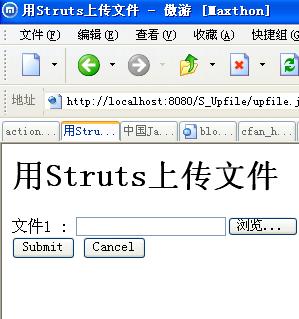
成功后界面: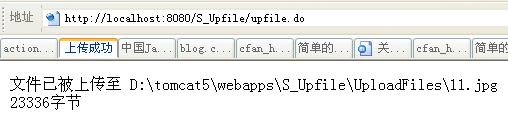
还有资源文件ApplicationResources_zh.properties
theFile1=请选择上传内容<br> #不知道为何不发挥作用
maxLengthExceeded=The path is too deep
参考文献:
Struts Web设计与开发大全
Struts编程基础与实例详解
http://dev.csdn.net/article/50/50395.shtm
最后
以上就是花痴烤鸡最近收集整理的关于简单的Sturts上传文件实现的全部内容,更多相关简单内容请搜索靠谱客的其他文章。
本图文内容来源于网友提供,作为学习参考使用,或来自网络收集整理,版权属于原作者所有。








发表评论 取消回复