在 http 报文头中,与缓存时间有关的两个字段是 Expires 以及 Cache-Control 中的 max-age,Expires 设定了一个缓存的过期时间,而 max-age 则设定了一个缓存有效时间(单位秒)
方法一:
配置修改:
1. 打开 httpd.conf 文件,将expires模块打开(去掉前面#号,重启即可)
LoadModule expires_module modules/mod_expires.so
2. 在httpd.conf文件最后增加如下文件即可:
ExpiresActive On
ExpiresByType text/html A300
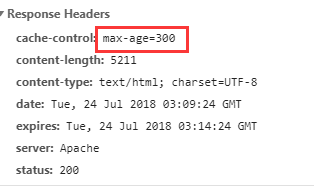
上面这句话是将类型为text/html文件缓存300秒
验证效果:
其他类似设置:
#启用expires_module模块
LoadModule expires_module modules/mod_expires.so
# 启用有效期控制
ExpiresActive On
# GIF有效期为1个月
ExpiresByType image/gif A2592000
# HTML文档的有效期是最后修改时刻后的一星期
ExpiresByType text/html M604800
#以下的含义类似
ExpiresByType text/css "now plus 2 months"
ExpiresByType text/js "now plus 2 days"
ExpiresByType image/jpeg "access plus 2 months"
ExpiresByType image/bmp "access plus 2 months"
ExpiresByType image/x-icon "access plus 2 months"
ExpiresByType image/png "access plus 2 months"
方法二:
使用mod_headers 模块增加 cache-control头
配置修改:
1.启用模块
LoadModule headers_module modules/mod_headers.so
2.可以在具体使用的增加如下配置即可
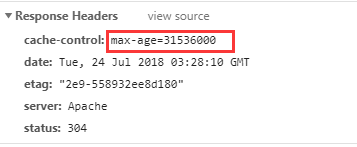
Header set Cache-Control "max-age=31536000"
验证效果:
最后
以上就是跳跃大山最近收集整理的关于html缓存时间设置时间设置时间设置,apache 中设置缓存时间的全部内容,更多相关html缓存时间设置时间设置时间设置,apache内容请搜索靠谱客的其他文章。








发表评论 取消回复