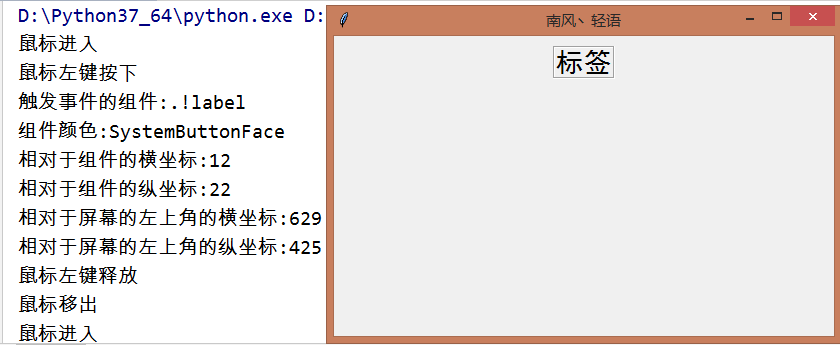
1、绑定鼠标事件并获取事件属性
# -*- encoding=utf-8 -*-
import tkinter
from tkinter import *
def left_mouse_down(event):
print('鼠标左键按下')
# 事件的属性
widget = event.widget
print('触发事件的组件:{}'.format(widget))
print('组件颜色:{}'.format(widget.cget('bg')))
widget_x = event.x # 相对于组件的横坐标x
print('相对于组件的横坐标:{}'.format(widget_x))
widget_y = event.y # 相对于组件的纵坐标y
print('相对于组件的纵坐标:{}'.format(widget_y))
x_root = event.x_root # 相对于屏幕的左上角的横坐标
print('相对于屏幕的左上角的横坐标:{}'.format(x_root))
y_root = event.y_root # 相对于屏幕的左上角的纵坐标
print('相对于屏幕的左上角的纵坐标:{}'.format(y_root))
def left_mouse_up(event):
print('鼠标左键释放')
def moving_mouse(event):
print('鼠标左键按下并移动')
def moving_into(event):
print('鼠标进入')
def moving_out(event):
print('鼠标移出')
def right_mouse_down(event):
print('鼠标右键按下')
def right_mouse_up(event):
print('鼠标右键释放')
def pulley_up(event):
print('滑轮向上滚动')
def focus(event):
print('聚焦事件')
def unfocus(event):
print('失焦事件')
if __name__ == '__main__':
win = tkinter.Tk() # 窗口
win.title('南风丶轻语') # 标题
screenwidth = win.winfo_screenwidth() # 屏幕宽度
screenheight = win.winfo_screenheight() # 屏幕高度
width = 500
height = 300
x = int((screenwidth - width) / 2)
y = int((screenheight - height) / 2)
win.geometry('{}x{}+{}+{}'.format(width, height, x, y)) # 大小以及位置
label = Label(text='标签', relief='g', font=('黑体', 20))
label.pack(pady=10)
label.bind('', left_mouse_down) # 鼠标左键按下
label.bind('', left_mouse_up) # 鼠标左键释放
label.bind('', right_mouse_down) # 鼠标右键按下
label.bind('', right_mouse_up) # 鼠标右键释放
label.bind('', moving_mouse) # 鼠标左键按下并移动
label.bind('', moving_into) # 鼠标移入事件
label.bind('', moving_out) # 鼠标移出事件
label.bind('', focus) # 聚焦事件
label.bind('', unfocus) # 失焦事件
label.focus_set() # 直接聚焦
Entry().pack()
win.mainloop()
2、绑定键盘事件并获取事件属性
参考 https://www.cnblogs.com/anita-harbour/p/9449757.html
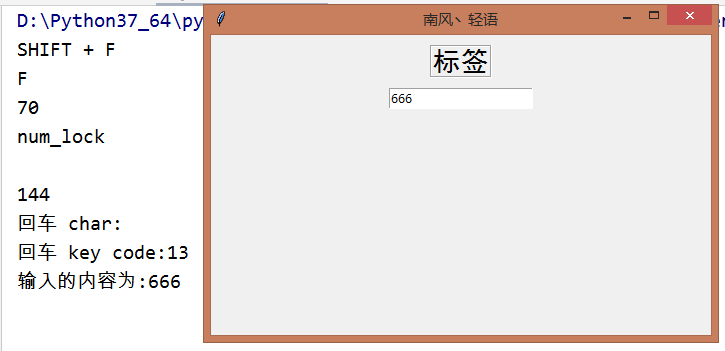
#-*- encoding=utf-8 -*-
importtkinterfrom tkinter import *
defkeyboard_event(event):
char=event.charprint('回车 char:{}'.format(char))
key_code=event.keycodeprint('回车 key code:{}'.format(key_code))defentry_enter(event):print('输入的内容为:' +entry.get())defshift_f(event):print('SHIFT + F')print(event.char)print(event.keycode)defnum_lock(event):print('num_lock')print(event.char)print(event.keycode)if __name__ == '__main__':
win= tkinter.Tk() #窗口
win.title('南风丶轻语') #标题
screenwidth = win.winfo_screenwidth() #屏幕宽度
screenheight = win.winfo_screenheight() #屏幕高度
width = 500height= 300x= int((screenwidth - width) / 2)
y= int((screenheight - height) / 2)
win.geometry('{}x{}+{}+{}'.format(width, height, x, y)) #大小以及位置
label= Label(text='标签', relief='g', font=('黑体', 20))
label.pack(pady=10)
label.focus_set()
label.bind('', keyboard_event) #按下回车
label.bind('', shift_f)
label.bind('', num_lock)
entry=Entry()
entry.pack()
entry.bind('', entry_enter) #按下回车
win.mainloop()
最后
以上就是从容黄豆最近收集整理的关于python bind_Python tkinter之Bind(绑定事件)的全部内容,更多相关python内容请搜索靠谱客的其他文章。








发表评论 取消回复