phantomjs因为是无头浏览器可以跑js,所以同样可以跑dom节点,用来进行网页抓取是再好不过了。
比如我们要批量抓取网页 “历史上的今天” 的内容。网站
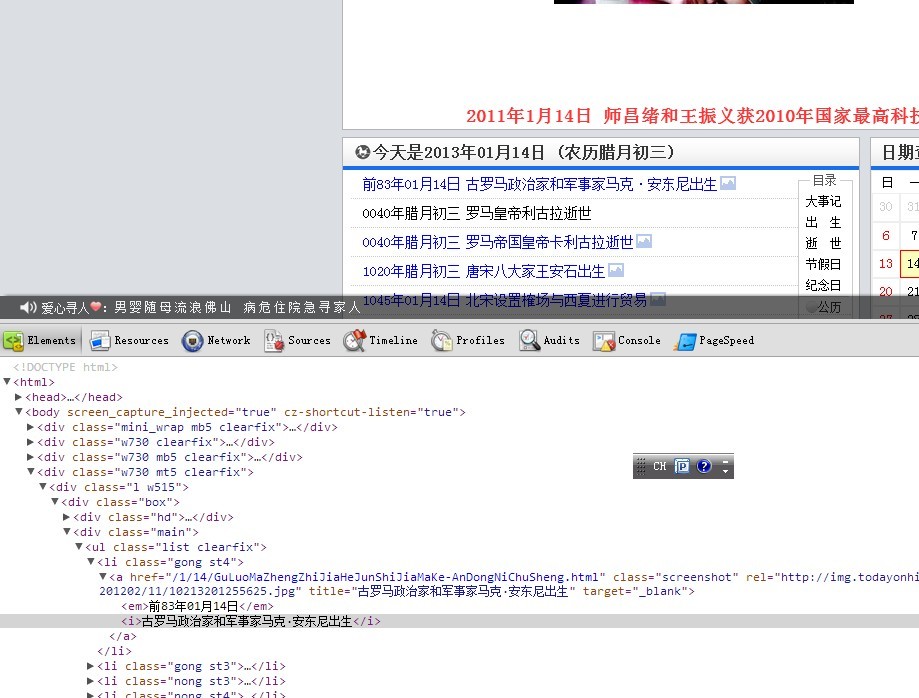
对dom结构的观察发现,我们只需要取到 .list li a的title值即可。因此我们利用高级选择器构建dom片段
var d= ''
var c = document.querySelectorAll('.list li a')
var l = c.length;
for(var i =0;i<l;i++){
d=d+c[i].title+'n'
}
之后只需要让js代码在phantomjs里跑起来即可~
var page = require('webpage').create();
	page.open('http://www.todayonhistory.com/', function (status) { //打开页面
		if (status !== 'success') {
			console.log('FAIL to load the address');
		} else {
			console.log(page.evaluate(function () {
					var d= ''
					var c = document.querySelectorAll('.list li a')
					var l = c.length;
					for(var i =0;i<l;i++){
					d=d+c[i].title+'n'
					}
						return d
				}))

		}
		phantom.exit();
	});
最终我们另存为catch.js,在dos里面执行一下,输出内容到txt文件(也可以用phantomjs的文件api来写)
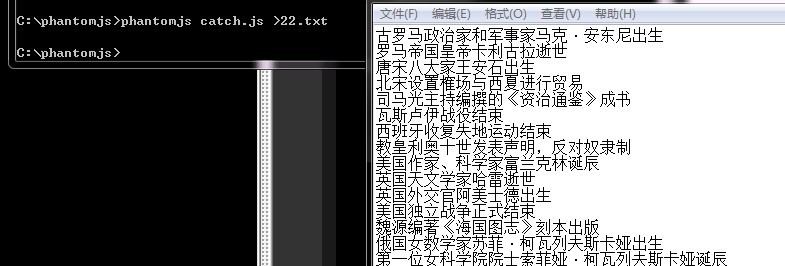
最后
以上就是能干毛衣最近收集整理的关于使用phantomjs进行网页抓取的实现代码的全部内容,更多相关使用phantomjs进行网页抓取内容请搜索靠谱客的其他文章。
本图文内容来源于网友提供,作为学习参考使用,或来自网络收集整理,版权属于原作者所有。








发表评论 取消回复