本文介绍了Vue2.0 实现单选互斥的方法,分享给大家,具体如下:

需要实现如上图的功能
1. 首次加载页面,根据data里的catgoryId高亮对应的选项
2. 点击某个选项,该选项高亮,其他去掉高亮
代码结构:
<template>
  <dd @click="changeCategory(currCourseFirst.categoryId)"
        v-for="currCourseFirst in currCourse.currCourseFirst"
        :key="currCourseFirst.categoryId"
        :class="resultCategoryId === currCourseFirst.categoryId ? 'active': ''" >
          {{currCourseFirst.name}}
  </dd>
</template>

<script>
  export default{
    data() {
      return {
        categeryId: this.$route.query.categoryId,
        typeId: this.$route.query.typeId
      }
    },
    methods: {
      changeCategoryId(categoryId) {
        this.categoryId = categoryId
      }
    },
    computed: {
      resultCategoryId(){
        return this.categoryId
      }
    }
  }
</script>
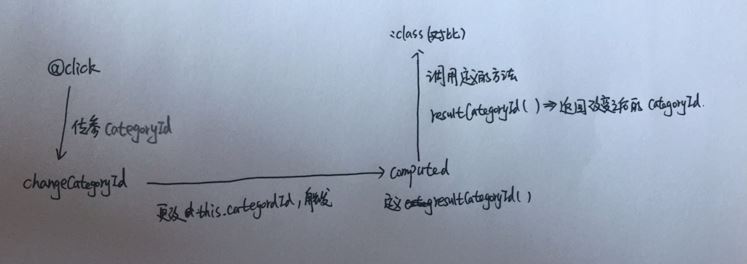
自我理解
参考链接:http://www.uoften.com/article/138185.htm
以上就是本文的全部内容,希望对大家的学习有所帮助,也希望大家多多支持靠谱客。
最后
以上就是唠叨咖啡最近收集整理的关于Vue2.0 实现单选互斥的方法的全部内容,更多相关Vue2.0内容请搜索靠谱客的其他文章。
本图文内容来源于网友提供,作为学习参考使用,或来自网络收集整理,版权属于原作者所有。








发表评论 取消回复