  @foreach (var item in ViewBag.FileInfoList)
            {
            <tr>
                <td>@item.IID</td>
                <td>@item.IName</td>
                <td>@item.TName</td>
                <td>@item.Creater</td>
                <td>@item.CreateDate</td>
                <td>@(item.State?"公布":"进行中")</td>
                //发布
                <td>
                    @if (!item.State)
                    {
                        <a href="~/Home/Publish?IID=@item.IID" onclick="return confirm('确定要发布吗?')">公布</a>
                    }

                    <a href="~/Home/delinfo?IID=@item.IID" onclick="return confirm('确定删除吗?')">删除</a>
                </td>
            </tr>
            }
Home控制器
 //公布
        public ActionResult Publish()
        {
            int IID = int.Parse(Request["IID"]);
            var fileInfo = db.FileInfo.Find(IID);
            fileInfo.State = true;
//State 是数据库中字段
            int count = db.SaveChanges();
            if (count>0)
            {
                return Content("<script>alert('内容已发布');window.location.href='Index'</script>");
            }
            else
            {
                return Content("<script>alert('内容发布失败');window.location.href='Index'</script>");
            }
        }
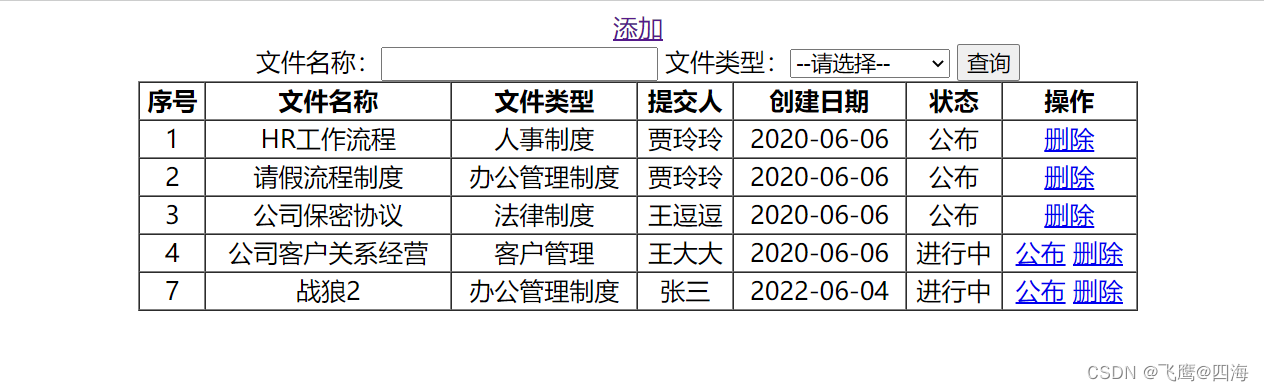
运行效果:
最后
以上就是爱笑灯泡最近收集整理的关于ASP.NET-MVC-发布的全部内容,更多相关ASP内容请搜索靠谱客的其他文章。
本图文内容来源于网友提供,作为学习参考使用,或来自网络收集整理,版权属于原作者所有。








发表评论 取消回复