我是靠谱客的博主 微笑摩托,这篇文章主要介绍cuda 9.0 安装torch 0.4_No module named torch_sparse, 及pytorch-geometric安装,现在分享给大家,希望可以做个参考。
pip安装完pytorch-geometric之后,报错No module named torch_sparse,搜了一下,居然是一个大坑,总结一下
先上踩坑前辈:
踩坑总结:No module named torch_sparseblog.csdn.net

小结:这个包就是个坑货(o(╥﹏╥)o)
下面两种方法实测都可以用,第二种更方面
1.下面是我安装的过程:
wget https://pytorch-geometric.com/whl/torch-1.5.0/torch_scatter-2.0.5%2Bcpu-cp37-cp37m-linux_x86_64.whl
pip install torch_scatter-2.0.5+cpu-cp37-cp37m-linux_x86_64.whl
wget https://pytorch-geometric.com/whl/torch-1.5.0/torch_sparse-0.6.6%2Bcpu-cp37-cp37m-linux_x86_64.whl
pip install torch_sparse-0.6.6+cpu-cp37-cp37m-linux_x86_64.whl
wget https://pytorch-geometric.com/whl/torch-1.5.0/torch_cluster-1.5.6%2Bcpu-cp37-cp37m-linux_x86_64.whl
pip install torch_cluster-1.5.6+cpu-cp37-cp37m-linux_x86_64.whl
wget https://pytorch-geometric.com/whl/torch-1.5.0/torch_spline_conv-1.2.0%2Bcpu-cp37-cp37m-linux_x86_64.whl
pip install torch_spline_conv-1.2.0+cpu-cp37-cp37m-linux_x86_64.whl
pip install torch-geometric
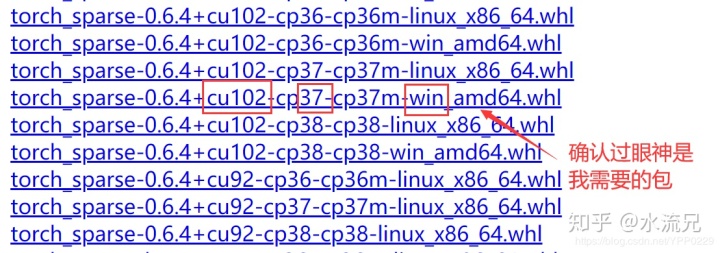
参考了第一篇文章,直接下载对应的编译文件,注意要对应好你自己的python版本以及及其环境,我的是python3.7, ubuntu。
可以从这个网址找对应的whl文件:https://pytorch-geometric.com/whl/torch-1.5.0.html
2.官网还有个教程,也是能用的。
$ pip install torch-scatter==latest+${CUDA} -f https://pytorch-geometric.com/whl/torch-${TORCH}.html
$ pip install torch-sparse==latest+${CUDA} -f https://pytorch-geometric.com/whl/torch-${TORCH}.html
$ pip install torch-cluster==latest+${CUDA} -f https://pytorch-geometric.com/whl/torch-${TORCH}.html
$ pip install torch-spline-conv==latest+${CUDA} -f https://pytorch-geometric.com/whl/torch-${TORCH}.html
$ pip install torch-geometricwhere${CUDA}and${TORCH}should be replaced by your specific CUDA version (cpu,cu92,cu101,cu102) and PyTorch version (1.4.0,1.5.0), respectively. For example, for PyTorch 1.5.0/1.5.1 and CUDA 10.2
根据个人电脑配置,选择相应的选项。
例如:
$ pip install torch-scatter==latest+cpu -f https://pytorch-geometric.com/whl/torch-1.5.0.html
$ pip install torch-sparse==latest+cpu -f https://pytorch-geometric.com/whl/torch-1.5.0.html
$ pip install torch-cluster==latest+cpu -f https://pytorch-geometric.com/whl/torch-1.5.0.html
$ pip install torch-spline-conv==latest+cpu -f https://pytorch-geometric.com/whl/torch-1.5.0.html
$ pip install torch-geometric
另外的另外:
如果报错:libtorch_cpu.so: cannot open shared object file: No such file or directory,
那么,你的pytorch可能版本太低了,需要更新到torch1.5.0或者1.5.1。
至此,完美解决
最后
以上就是微笑摩托最近收集整理的关于cuda 9.0 安装torch 0.4_No module named torch_sparse, 及pytorch-geometric安装的全部内容,更多相关cuda内容请搜索靠谱客的其他文章。
本图文内容来源于网友提供,作为学习参考使用,或来自网络收集整理,版权属于原作者所有。








发表评论 取消回复