第一步:首先进入数据库,建库,建表。
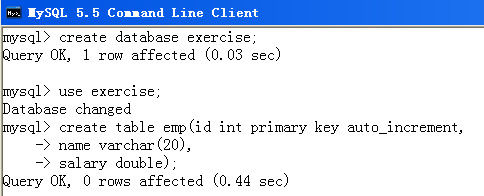
第二步:在myeclipse中新建一个web工程,我的就为web01_demo,接着在WebRoot下新建一个add.jsp文件。
add.jsp的代码十分简单:
My JSP 'add.jsp' starting pageadd employee
name:
salary:
第三步:写提供服务的Servlet,这里为AddEmployeeServlet,采取继承HttpServlet的方式,在web.xml文件中映射的url为add。
AddEmployeeServlet的代码如下:
public class AddEmployeeServlet extends HttpServlet {
private static final String URL="jdbc:mysql://localhost:3306/exercise";
private static final String USER="root";
private static final String PASS="mysqladmin";
public void service(HttpServletRequest request, HttpServletResponse response)
throws ServletException {
String name=request.getParameter("name");
String salary=request.getParameter("salary");
Connection conn=null;
PreparedStatement pstmt=null;
try {
Class.forName("com.mysql.jdbc.Driver");
conn=DriverManager.getConnection(URL,USER,PASS);
pstmt=conn.prepareStatement(
"insert into emp(name,salary) values(?,?)");
pstmt.setString(1,name);
pstmt.setDouble(2,Double.parseDouble(salary));
pstmt.executeUpdate();
PrintWriter pw=response.getWriter();
pw.print("
add success
");} catch (ClassNotFoundException e) {
e.printStackTrace();
} catch (SQLException e) {
e.printStackTrace();
} catch (IOException e) {
e.printStackTrace();
}finally{
try {
pstmt.close();
} catch (SQLException e) {
e.printStackTrace();
}
try {
conn.close();
} catch (SQLException e) {
e.printStackTrace();
}
}
}
}
第四步:在myeclipse中部署应用web01_demo,接着启动Tomcat服务器。
在浏览器里输入:http://localhost:8080/web01_demo/add.jsp
浏览器返回页面,在表单中输入姓名和薪水,点击confirm按钮,提交,即可将数据写入exercise数据库的emp表。
最后
以上就是粗犷外套最近收集整理的关于mysql数据库中新增emp_Servlet中利用JDBC操作数据库,往emp表中添加数据 | 学步园的全部内容,更多相关mysql数据库中新增emp_Servlet中利用JDBC操作数据库,往emp表中添加数据内容请搜索靠谱客的其他文章。








发表评论 取消回复