我是靠谱客的博主 干净裙子,这篇文章主要介绍httpd+wildfly jboss集群搭建一、准备工具 二、jboss安装与配置三、apache http server 配置四、启动,现在分享给大家,希望可以做个参考。
一、准备工具
jboss wildfly8.2
下载地址:http://wildfly.org/downloads/
apache http server2.2
下载地址:http://httpd.apache.org/download.cgi
自备两台pc机
二、jboss安装与配置
解压wildfly8.2到两台pc机种的d盘根目录。
选择两台pc机其中一台作为master,另一台做slave.
master配置
a. 修改domain/configuration/host.xml
将
<interfaces>
    <interface name="management">
        <inet-address value="${jboss.bind.address.management:127.0.0.1}"/>
    </interface>
    <interface name="public">
       <inet-address value="${jboss.bind.address:127.0.0.1}"/>
    </interface>
    <interface name="unsecured">
       <inet-address value="127.0.0.1" />
    </interface>
</interfaces><interfaces>
<interface name="management"
<inet-address value="${jboss.bind.address.management:<span style="color:#ff0000;">192.168.24.107</span>}"/>
</interface>
<interface name="public">
<inet-address value="${jboss.bind.address:<span style="color:#ff0000;">192.168.24.107</span>}"/>
</interface>
<interface name="unsecured">
<inet-address value="<span style="color:#ff0000;">192.168.24.107</span>" />
</interface>
</interfaces> b.添加管理型用户
wildfly 根目录/bin/adduser.bat
用户名:slave
密码:!admin123
slave配置
a. 修改domain/configuration/host.xml
修改
<host name="master" xmlns="urn:jboss:domain:1.1"><host name="slave" xmlns="urn:jboss:domain:1.1">修改 security-realms节点
<security-realms>
   <security-realm name="ManagementRealm">
       <server-identities>
           <secret value="MTIzMTIz="/>
       </server-identities>
       <authentication>
           <properties path="mgmt-users.properties" relative-to="jboss.domain.config.dir"/>
       </authentication>
   </security-realm>
</security-realms><domain-controller>
<remote host="<span style="color:#ff0000;">192.168.24.107</span>" port="9999" security-realm="ManagementRealm"/>
</domain-controller>配置interfaces
<interfaces>
    <interface name="management">
        <inet-address value="${jboss.bind.address.management:<span style="color:#ff0000;">192.168.24.42</span>}"/>
    </interface>
    <interface name="public">
       <inet-address value="${jboss.bind.address:<span style="color:#ff0000;">192.168.24.42</span>}"/>
    </interface>
    <interface name="unsecured">
       <inet-address value="<span style="color:#ff0000;">192.168.24.42</span>" />
    </interface>
</interfaces>三、apache http server 配置
下载并解压到master服务器,修改conf/httpd.conf
a.添加module
LoadModule slotmem_module modules/mod_slotmem.so
LoadModule manager_module modules/mod_manager.so
LoadModule proxy_cluster_module modules/mod_proxy_cluster.so
LoadModule advertise_module modules/mod_advertise.so
b.修改listen为master ip及80端口
Listen 192.168.24.107:80
c.在文件末尾添加
<VirtualHost 192.168.24.107:10001>

  <Directory />
    Order deny,allow
    Deny from all
    Allow from 192.168.24.
  </Directory>


  # This directive allows you to view mod_cluster status at URL http://10.211.55.4:10001/mod_cluster-manager
  <Location /mod_cluster-manager>
   SetHandler mod_cluster-manager
   Order deny,allow
   Deny from all 192.168.24.
   Allow from
  </Location>

  KeepAliveTimeout 60
  MaxKeepAliveRequests 0

  ManagerBalancerName other-server-group
  AdvertiseFrequency 5

</VirtualHost>
四、启动
a.首先启动apache http server
b.以domain模式分别启动master和slave
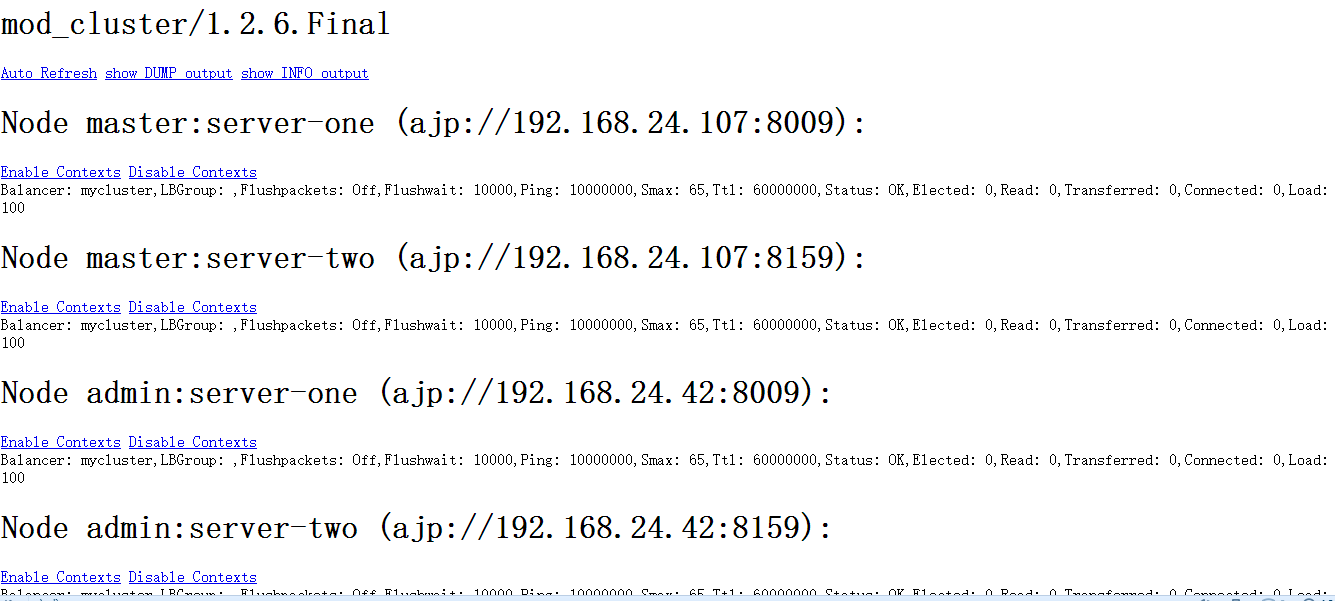
访问http://192.168.24.107:6666/出现以下界面则代表成功。
最后
以上就是干净裙子最近收集整理的关于httpd+wildfly jboss集群搭建一、准备工具 二、jboss安装与配置三、apache http server 配置四、启动的全部内容,更多相关httpd+wildfly内容请搜索靠谱客的其他文章。
本图文内容来源于网友提供,作为学习参考使用,或来自网络收集整理,版权属于原作者所有。








发表评论 取消回复