首先CentOS7.5的防火墙改为了firewall-cmd,而非iptables
1、防火墙的使用:
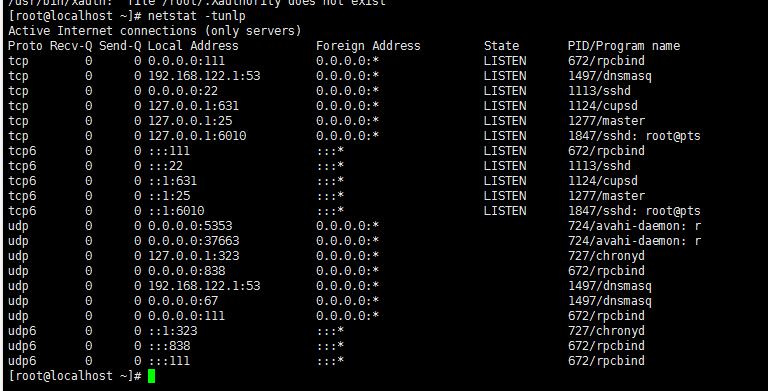
首先使用netstat -tunlp命令来查看当前已经在使用的端口,如下图所示:
2、使用firewall-cmd --list-ports命令来查看已经添加到防火墙的端口,如下图所示:

3、添加一个端口:firewall-cmd --permanent --add-port=4202/tcp --permanent,其中--permanent表示永久性的,注意添加后要执行:firewall-cmd --reload进行重新载入,
4、重启防火墙:service firewalld restart

5、查看防火墙状态:firewall-cmd --state

6、service firewalld start 开启防火墙
7、service firewalld stop 关闭防火墙
8、systemctl disable firewalld 关闭开机启动

9、关闭内核防火墙
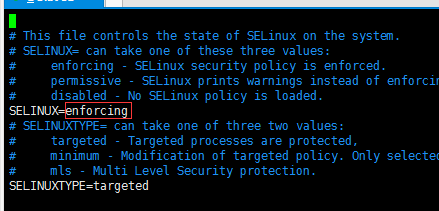
首先编辑vim /etc/selinux/config,如下图所示:
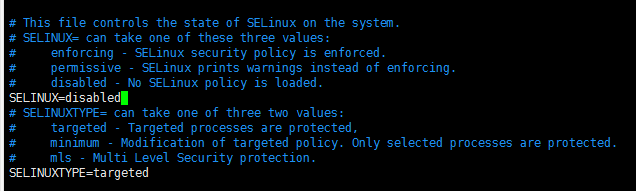
将SELINUX=enforcing改为SELINUX=disabled即可,如下图所示:
10、最后重启系统即可。
最后
以上就是爱笑小蜜蜂最近收集整理的关于CentOS7.5关闭防火墙、禁用防火墙、关闭内核防火墙、以及防火墙的使用的全部内容,更多相关CentOS7.5关闭防火墙、禁用防火墙、关闭内核防火墙、以及防火墙内容请搜索靠谱客的其他文章。
本图文内容来源于网友提供,作为学习参考使用,或来自网络收集整理,版权属于原作者所有。








发表评论 取消回复