在使用iOS推送时,出现下面错误:
**[1412:60b] You've implemented -[<UIApplicationDelegate> application:performFetchWithCompletionHandler:], but you still need to
add "fetch" to the list of your supported UIBackgroundModes in your Info.plist.


**[1412:60b] You've implemented -[<UIApplicationDelegate> application:didReceiveRemoteNotification:fetchCompletionHandler:],
but you still need to add "remote-notification" to the list of your supported UIBackgroundModes in your Info.plist.
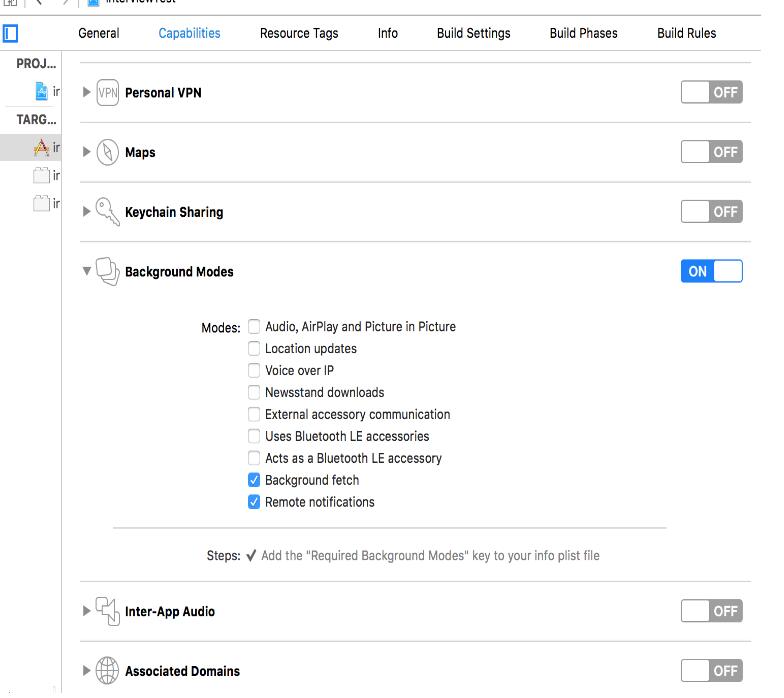
解决方法:PORJECT --> Capabilities --> Background Modes --> Background fetch & Remote notifications -->选中为on 状态
我还遇到一种情况
You've implemented -[<UIApplicationDelegate> application:didReceiveRemoteNotification:fetchCompletionHandler:], but you still need to add "remote-notification" to the list of your supported UIBackgroundModes in your Info.plist.
破解方法还 和上面是一样的,如图
以上就是本文的全部内容,希望对大家的学习有所帮助,也希望大家多多支持靠谱客。
最后
以上就是丰富战斗机最近收集整理的关于使用iOS推送时警告错误的解决方法的全部内容,更多相关使用iOS推送时警告错误内容请搜索靠谱客的其他文章。
本图文内容来源于网友提供,作为学习参考使用,或来自网络收集整理,版权属于原作者所有。








发表评论 取消回复