首先需要了解需要爬取的数据的网页的结构,其结构如下图所示(只截取了部分):
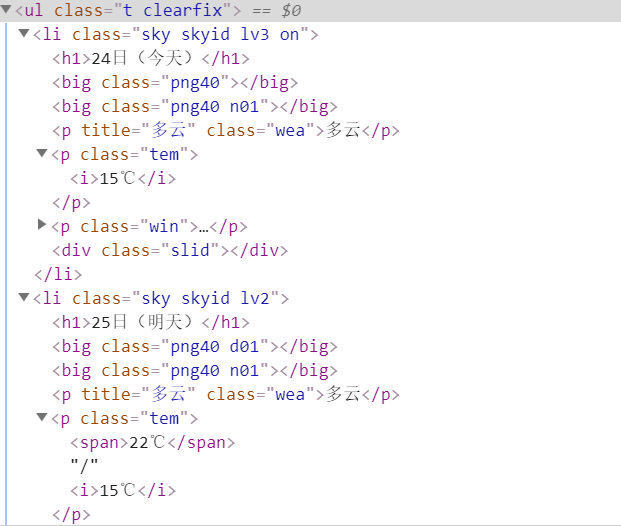
从图中可以看出每一天的天气数据都被一个<li></li>包含,这七天的数据又都包含在一个<ul></ul>中。
所以我们的目标就是获取ul下每个li中的数据。注意,“今天”的数据中温度只有一个数值,而其后6天的
数据温度都有两个数值,需要单独处理。
代码如下(IDE:pycharm):
from bs4 import BeautifulSoup
from bs4 import UnicodeDammit
import urllib.request
import sqlite3

class WeatherDB:
    def openDB(self):
        # 使用sqlite3建立的weathers数据库
        self.con = sqlite3.connect("weathers.db")
        self.cursor = self.con.cursor()
        try:
            self.cursor.execute("create table weathers (wCity varchar(16),wDate varchar(16),wWeather varchar(64),wTemp varchar(32),constraint pk_weather primary key(wCity,wDate))")
        except:
            self.cursor.execute("delete from weathers")
    def closeDB(self):
        self.con.commit()
        self.con.close()
    def insert(self,city,date,weather,temp):
        try:
            self.cursor.execute("insert into weathers(wCity,wDate,wWeather,wTemp) values(?,?,?,?)",(city,date,weather,temp))
        except Exception as err:
            print(err)
    def show(self):
        self.cursor.execute("select * from weathers")
        rows = self.cursor.fetchall()
        print("%-16s%-16s%-32s%-16s"%("city","date","weather","temp"))
        for row in rows:
            print("%-16s%-16s%-32s%-16s"%(row[0],row[1],row[2],row[3]))
class WeatherForecast:
    def __init__(self):
        # 构造请求头,模拟浏览器
        self.headers={
            "User-Agent":"Mozilla/5.0(Windows; U; Windows NT 6.0 x64; en-US; rv:1.9pre)Gecko/2008072421 Minefield/3.0.2pre"
        }
        # 要爬取的四个城市的名称及其在中国天气网所对应的代码
        self.cityCode={
            "北京":"101010100","上海":"101020100","广州":"101280101",
            "深圳":"101280601"
        }
    def forecastCity(self, city):
        if city not in self.cityCode.keys():
            print(city+"code cannot be found")
            return
        # 要访问的网址
        url = "http://www.weather.com.cn/weather/"+self.cityCode[city]+".shtml"
        try:
            #构造request的参数
            req = urllib.request.Request(url, headers=self.headers)
            data = urllib.request.urlopen(req)
            data = data.read()
            dammit = UnicodeDammit(data, ["utf-8","gbk"])
            # data中就是返回来的整个网页
            data = dammit.unicode_markup
            soup = BeautifulSoup(data, features="html.parser")
            # 借助BeautifulSoup查找class是‘t clearfix'的ul中所有的li
            lis = soup.select("ul[class='t clearfix'] li")
            # 用来区分“今天”和其余6天
            n=0
            for li in lis:
                try:
                    # 获取li下h1中的文本值
                    date = li.select('h1')[0].text
                    # 获取标签li下class是“wea”的p标签下的文本值
                    weather = li.select('p[class="wea"]')[0].text
                    if n>0:
                        # 对应其余六天,有2个温度需要提取,获取标签li下class是“tem”的p标签下的span标签的文本值
                        temp = li.select('p[class="tem"] span')[0].text+"/"+li.select('p[class="tem"] i')[0].text
                    else:
                        # 对应“今天”,有1个温度需要提取,获取标签li下class是“tem”的p标签下的i标签的文本值
                        temp = li.select('p[class="tem"] i')[0].text
                    print(city,date,weather,temp)
                    n=n+1
                    # 将数据插入数据库
                    self.db.insert(city,date,weather,temp)
                except Exception as err:
                    print(err)
        except Exception as err:
            print(err)
    def process(self,cities):
        self.db = WeatherDB()
        self.db.openDB()
        for city in cities:
            self.forecastCity(city)
        self.db.closeDB()
ws = WeatherForecast()
ws.process(["北京","上海","广州","深圳"])
print("comploted")
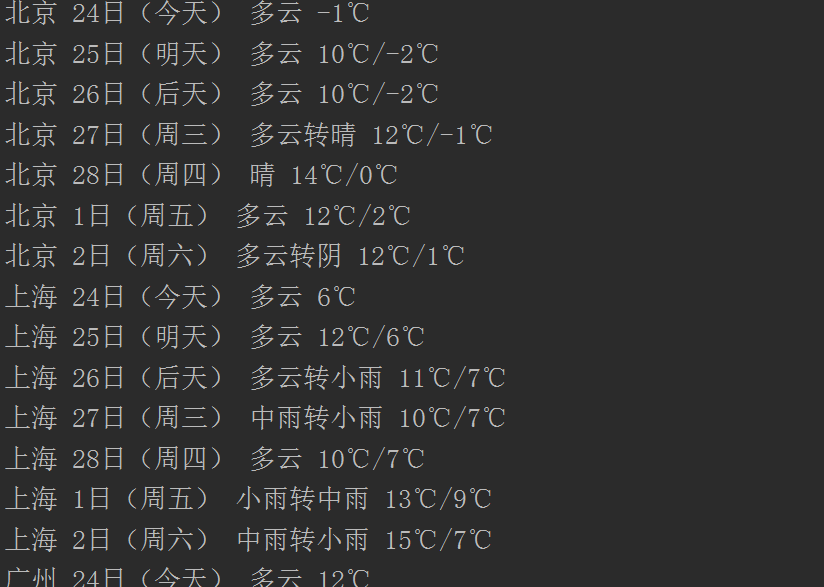
运行上述代码后,可以看到如下结果:
我也不是很懂,大家多多指教。
最后
以上就是朴实花瓣最近收集整理的关于简单的爬取中国天气网某个城市七天的天气预报数据的全部内容,更多相关简单内容请搜索靠谱客的其他文章。
本图文内容来源于网友提供,作为学习参考使用,或来自网络收集整理,版权属于原作者所有。








发表评论 取消回复