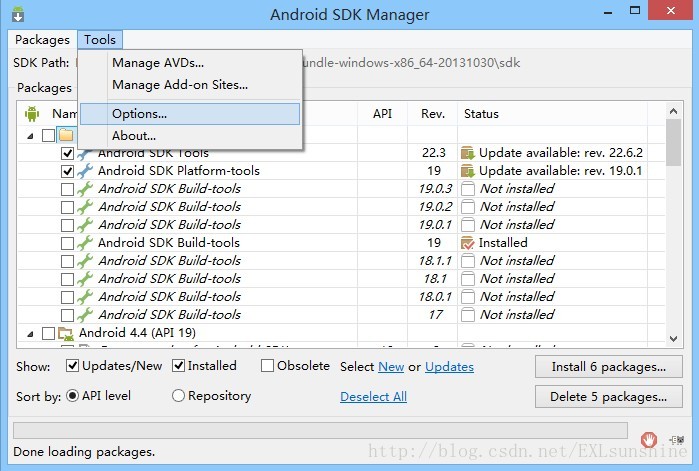
1、打开android sdk manager
2、打开tool->options,如图所示
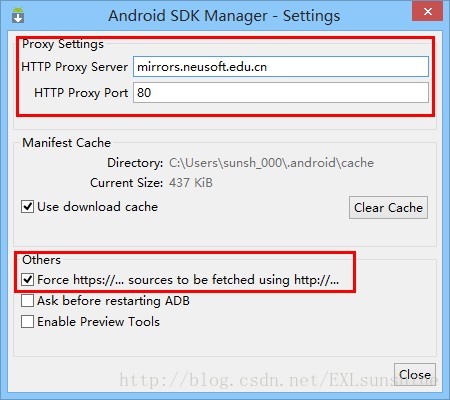
3、将Proxy Settings 里的HTTP Proxy Server和HTTP Proxy Port分别设置成mirrors.neusoft.edu.cn和80
将Others中的Force https://...sources to be fetched using http://...复选框勾上
如下图所示:
4、重启Eclipse见证奇迹吧~
转载于:https://www.cnblogs.com/exlsunshine/p/3775084.html
最后
以上就是懵懂小猫咪最近收集整理的关于解决Android SDK Manager下载太慢问题的全部内容,更多相关解决Android内容请搜索靠谱客的其他文章。
本图文内容来源于网友提供,作为学习参考使用,或来自网络收集整理,版权属于原作者所有。

![[Phonegap+Sencha Touch] 移动开发44 eclipse一直是Android sdk content loader 0%的解决方案](https://www.shuijiaxian.com/files_image/reation/bcimg25.png)






发表评论 取消回复