利用Vue,fetch实现前后端数据交互
利用fetch实现数据的交互,简单练习的小实例。
- 目录结构
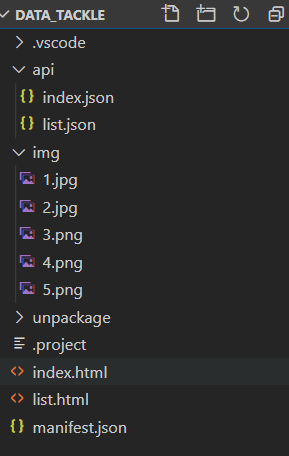
- index.html代码
<!DOCTYPE html>
<html>
<head>
    <meta charset="utf-8">
    <meta name="viewport" content="initial-scale=1.0, maximum-scale=1.0, user-scalable=no" />
    <title></title>
    <script type="text/javascript">

   		document.addEventListener('plusready', function(){
   			//console.log("所有plus api都应该在此事件发生后调用,否则会出现plus is undefined。"

   		});

    </script>
	<style type="text/css">
		ul{
			width: 80vw;
		}
    	ul li{
			width: 80vw;
			height: 5vh;
    		background-color: red;
    		margin-top: 10vh;
			list-style: none;
			text-align: center;
    	}
		.tag{
			width: 20vw;
			height: 30px;
			background-color: blue;
			margin-top: 10px;
		}
		.list  img{
			width: 30px;
			height: 30px;
			position:absolute;
			left: 8px;
		}
    </style>
</head>
<body>
		<div style="width: 100px;height:100px;background:red;"><a href="list.html">list</a></div>
	<div id="app">
		<ul class="list" v-for=" item in categories ">

			<li>
					<img :src=item.icon >
					{{item.name}}
			</li>
			<div class="tag" v-for = "tag in item.tags">{{tag}}</div>
		</ul>
	</div>
	<script src="https://cdnjs.cloudflare.com/ajax/libs/vue/2.6.10/vue.min.js" ></script>
	<script src="https://cdnjs.cloudflare.com/ajax/libs/fetch/3.0.0/fetch.min.js" ></script>
	<!-- 兼容 feach 异步请求 -->
	<script type="text/javascript">
		const vm =  new Vue({
			el:'#app',
			data:{
				categories:[]
			},
			created() {
				 fetch('http://127.0.0.1:5500/api/index.json')
				 	.then(res => {
						 return res.json()
					 })
					.then( data=> {
						// return data;// 真正的数据
						vm.categories = data;
					})
			},
		})
	</script>
</body>
</html>
- index.json中数据(可自己改,或者调用后台接口)
[
    {
        "icon":"./img/1.jpg",
        "name":"技术",
        "tags":["java","php","js"]
    },
    {
        "icon":"./img/2.jpg",
        "name":"职业",
        "tags":["js","node","vue"]
    },
    {
        "icon":"./img/2.jpg",
        "name":"职业",
        "tags":["js","node","vue"]
    },
    {
        "icon":"./img/2.jpg",
        "name":"职业",
        "tags":["js","node","vue"]
    },
    {
        "icon":"./img/2.jpg",
        "name":"职业",
        "tags":["js","node","vue"]
    }
]
- list.html,list.json形式一样,可以参考上面来实现完成。
最后
以上就是老迟到牛排最近收集整理的关于利用Vue,fetch实现前后端数据交互的全部内容,更多相关利用Vue内容请搜索靠谱客的其他文章。
本图文内容来源于网友提供,作为学习参考使用,或来自网络收集整理,版权属于原作者所有。








发表评论 取消回复