我是靠谱客的博主 忧心眼神,这篇文章主要介绍去掉Mybatis generator自动生成的注解,及报错:“元素类型为 “context“ 的内容必须匹配 ”的处理,现在分享给大家,希望可以做个参考。
配置了mybatis的generator之后,会发现生成的类中会有自动生成的注解:
public interface OrderMapper {
    /**
     * This method was generated by MyBatis Generator.
     * This method corresponds to the database table mall_order
     *
     * @mbg.generated Fri Mar 07 20:06:38 CST 2022
     */
    long countByExample(OrderExample example);
这些都是一些套话,没什么实际的作用。去掉的方法:
在generator配置文件中加入:
<commentGenerator>
	<property name="suppressAllComments" value="true"/>
</commentGenerator>
再次运行,报错。
[ERROR] XML Parser Error on line 46: 元素类型为 "context" 的内容必须匹配 "(property*,plugin*,commentGenerator?,(connectionFactory|jdbcConnection),javaTypeResolver?,javaModelGenerator,sq
lMapGenerator?,javaClientGenerator?,table+)"。
原因:
context标签的子元素是有顺序的,顺序为
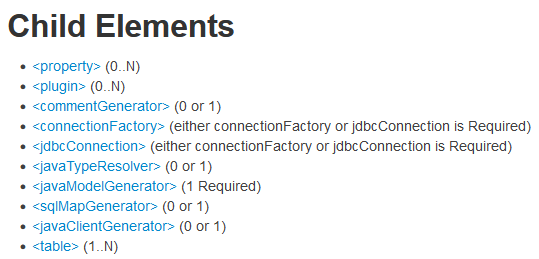 即其官网上显示的顺序。
而我原来的顺序:
<context id="DB2Tables" targetRuntime="MyBatis3">
    <jdbcConnection driverClass="com.mysql.jdbc.Driver"
                    connectionURL=""
                    userId=""
                    password="">
    </jdbcConnection>

    <commentGenerator>
        <property name="suppressAllComments" value="true"/>
    </commentGenerator>
调整顺序:
<context id="DB2Tables" targetRuntime="MyBatis3">

    <commentGenerator>
        <property name="suppressAllComments" value="true"/>
    </commentGenerator>

    <jdbcConnection driverClass="com.mysql.jdbc.Driver"
运行成功。
最后
以上就是忧心眼神最近收集整理的关于去掉Mybatis generator自动生成的注解,及报错:“元素类型为 “context“ 的内容必须匹配 ”的处理的全部内容,更多相关去掉Mybatis内容请搜索靠谱客的其他文章。
本图文内容来源于网友提供,作为学习参考使用,或来自网络收集整理,版权属于原作者所有。








发表评论 取消回复