转载自:多任务深度学习
基于Caffe实现多任务学习的小样例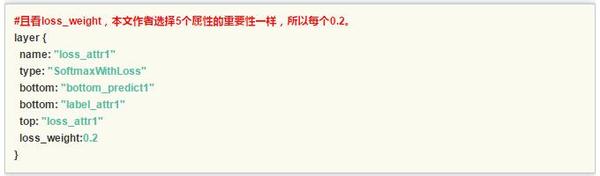
作者:程程
链接:https://zhuanlan.zhihu.com/p/22190532
来源:知乎
著作权归作者所有。商业转载请联系作者获得授权,非商业转载请注明出处。
基于Caffe实现多任务学习的小样例
本节在目前广泛使用的深度学习开源框架Caffe的基础上实现多任务深度学习算法所需的多维标签输入。默认的,Caffe中的Data层只支持单维标签,为了支持多维标签,首先修改Caffe中的convert_imageset.cpp以支持多标签:
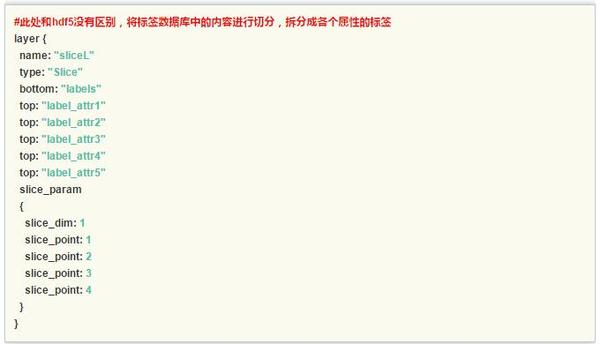
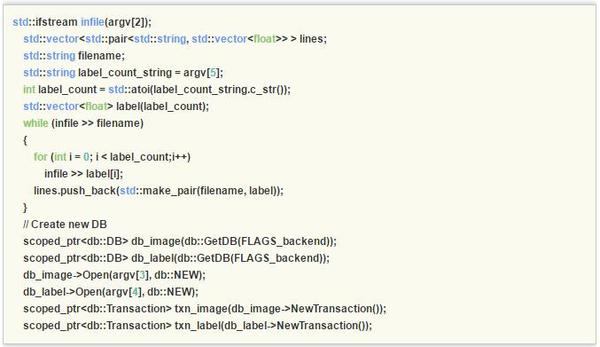 这样我们就有了多任务的深度学习的基础部分数据输入。为了向上兼容Caffe框架,本文摒弃了部分开源实现增加Data层标签维度选项并修改Data层代码的做法,直接使用两个Data层将数据读入,即分别读入数据和多维标签,接下来介绍对应的网络结构文件prototxt的修改,注意红色的注释部分。
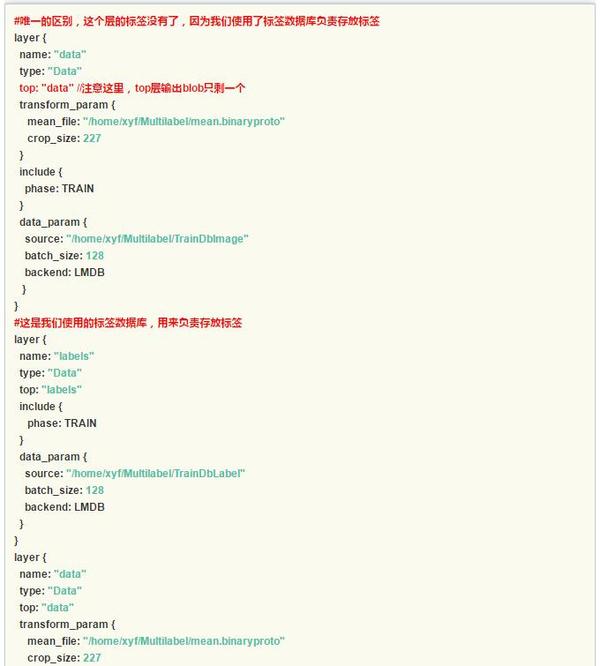
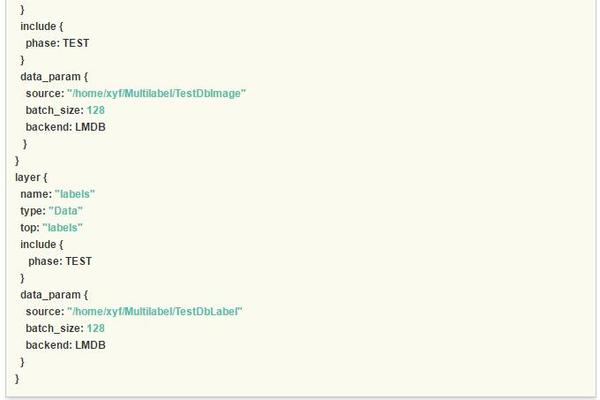 特别的,slice层对多维的标签进行了切分,为每个任务输出了单独的标签。
 另外一个值得讨论的是每个任务的权重设置,在本文实践中五个任务设置为等权重loss_weight:0.2。一般的,建议所有任务的权重值相加为1,如果这个数值不设置,可能会导致网络收敛不稳定,这是因为多任务学习中对不同任务的梯度进行累加,导致梯度过大,甚至可能引发参数溢出错误导致网络训练失败。
作者:程程
链接:https://zhuanlan.zhihu.com/p/22190532
来源:知乎
著作权归作者所有。商业转载请联系作者获得授权,非商业转载请注明出处。
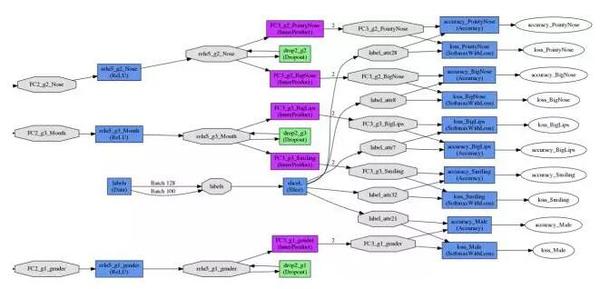
多任务损失函数层的网络结构示意图如下图所示:
| // This program converts a set of images to a lmdb/leveldb by storing them |
| // as Datum proto buffers. |
| // Usage: |
| // convert_imageset [FLAGS] ROOTFOLDER/ LISTFILE DB_NAME |
| // |
| // where ROOTFOLDER is the root folder that holds all the images, and LISTFILE |
| // should be a list of files as well as their labels, in the format as |
| // subfolder1/file1.JPEG 7 |
| // .... |
| //#ifdef MULTILABEL |
| #include <algorithm> |
| #include <fstream> // NOLINT(readability/streams) |
| #include <string> |
| #include <utility> |
| #include <vector> |
| #include "boost/scoped_ptr.hpp" |
| #include "gflags/gflags.h" |
| #include "glog/logging.h" |
| #include "caffe/proto/caffe.pb.h" |
| #include "caffe/util/db.hpp" |
| #include "caffe/util/format.hpp" |
| #include "caffe/util/io.hpp" |
| #include "caffe/util/rng.hpp" |
| using namespace caffe; // NOLINT(build/namespaces) |
| using std::pair; |
| using boost::scoped_ptr; |
| DEFINE_bool(gray, false, |
| "When this option is on, treat images as grayscale ones"); |
| DEFINE_bool(shuffle, false, |
| "Randomly shuffle the order of images and their labels"); |
| DEFINE_string(backend, "lmdb", |
| "The backend {lmdb, leveldb} for storing the result"); |
| DEFINE_int32(resize_width, 0, "Width images are resized to"); |
| DEFINE_int32(resize_height, 0, "Height images are resized to"); |
| DEFINE_bool(check_size, false, |
| "When this option is on, check that all the datum have the same size"); |
| DEFINE_bool(encoded, false, |
| "When this option is on, the encoded image will be save in datum"); |
| DEFINE_string(encode_type, "", |
| "Optional: What type should we encode the image as ('png','jpg',...)."); |
| int main(int argc, char** argv) { |
| #ifdef USE_OPENCV |
| ::google::InitGoogleLogging(argv[0]); |
| // Print output to stderr (while still logging) |
| FLAGS_alsologtostderr = 1; |
| #ifndef GFLAGS_GFLAGS_H_ |
| namespace gflags = google; |
| #endif |
| gflags::SetUsageMessage("Convert a set of images to the leveldb/lmdbn" |
| "format used as input for Caffe.n" |
| "Usage:n" |
| " convert_imageset [FLAGS] ROOTFOLDER/ LISTFILE DB_NAMEn" |
| "The ImageNet dataset for the training demo is atn" |
| " http://www.image-net.org/download-imagesn"); |
| gflags::ParseCommandLineFlags(&argc, &argv, true); |
| if (argc < 6) { |
| gflags::ShowUsageWithFlagsRestrict(argv[0], "tools/convert_imageset"); |
| return 1; |
| } |
| const bool is_color = !FLAGS_gray; |
| const bool check_size = FLAGS_check_size; |
| const bool encoded = FLAGS_encoded; |
| const string encode_type = FLAGS_encode_type; |
| std::ifstream infile(argv[2]); |
| std::vector<std::pair<std::string, std::vector<float>> > lines; |
| std::string filename; |
| std::string label_count_string = argv[5]; |
| int label_count = std::atoi(label_count_string.c_str()); |
| std::vector<float> label(label_count); |
| while (infile >> filename) |
| { |
| for (int i = 0; i < label_count;i++) |
| { |
| infile >> label[i]; |
| } |
| lines.push_back(std::make_pair(filename, label)); |
| } |
| if (FLAGS_shuffle) { |
| // randomly shuffle data |
| LOG(INFO) << "Shuffling data"; |
| shuffle(lines.begin(), lines.end()); |
| } |
| LOG(INFO) << "A total of " << lines.size() << " images."; |
| if (encode_type.size() && !encoded) |
| LOG(INFO) << "encode_type specified, assuming encoded=true."; |
| int resize_height = std::max<int>(0, FLAGS_resize_height); |
| int resize_width = std::max<int>(0, FLAGS_resize_width); |
| // Create new DB |
| scoped_ptr<db::DB> db_image(db::GetDB(FLAGS_backend)); |
| scoped_ptr<db::DB> db_label(db::GetDB(FLAGS_backend)); |
| db_image->Open(argv[3], db::NEW); |
| db_label->Open(argv[4], db::NEW); |
| scoped_ptr<db::Transaction> txn_image(db_image->NewTransaction()); |
| scoped_ptr<db::Transaction> txn_label(db_label->NewTransaction()); |
| // Storing to db |
| std::string root_folder(argv[1]); |
| Datum datum_label; |
| Datum datum_image; |
| int count = 0; |
| int data_size_label = 0; |
| int data_size_image = 0; |
| bool data_size_initialized = false; |
| for (int line_id = 0; line_id < lines.size(); ++line_id) { |
| bool status; |
| std::string enc = encode_type; |
| if (encoded && !enc.size()) { |
| // Guess the encoding type from the file name |
| string fn = lines[line_id].first; |
| size_t p = fn.rfind('.'); |
| if (p == fn.npos) |
| LOG(WARNING) << "Failed to guess the encoding of '" << fn << "'"; |
| enc = fn.substr(p); |
| std::transform(enc.begin(), enc.end(), enc.begin(), ::tolower); |
| } |
| status = ReadImageToDatum(root_folder + lines[line_id].first, |
| lines[line_id].second[0], resize_height, resize_width, is_color, |
| enc, &datum_image); |
| if (status == false) continue; |
| datum_label.set_height(1); |
| datum_label.set_width(1); |
| datum_label.set_channels(label_count); |
| int count_tmp = datum_label.float_data_size(); |
| for (int index_label = 0; index_label < lines[line_id].second.size(); index_label++) |
| { |
| float tmp_float_value = lines[line_id].second[index_label]; |
| datum_label.add_float_data(tmp_float_value); |
| } |
| if (check_size) { |
| if (!data_size_initialized) { |
| data_size_label = datum_label.channels() * datum_label.height() * datum_label.width(); |
| data_size_image = datum_image.channels() * datum_image.height() * datum_image.width(); |
| data_size_initialized = true; |
| } |
| else { |
| const std::string& data_label = datum_label.data(); |
| CHECK_EQ(data_label.size(), data_size_label) << "Incorrect data field size " |
| << data_label.size(); |
| const std::string& data_image = data_image.data(); |
| CHECK_EQ(data_image.size(), data_size_image) << "Incorrect data field size " |
| << data_image.size(); |
| } |
| } |
| // sequential |
| string key_str_image = caffe::format_int(line_id, 8) + "_" + lines[line_id].first; |
| string key_str_label = caffe::format_int(line_id, 8) + "label_" + lines[line_id].first; |
| // Put in db |
| string out_label; |
| string out_image; |
| CHECK(datum_label.SerializeToString(&out_label)); |
| CHECK(datum_image.SerializeToString(&out_image)); |
| datum_label.clear_float_data(); |
| txn_label->Put(key_str_label, out_label); |
| txn_image->Put(key_str_image, out_image); |
| if (++count % 1000 == 0) { |
| // Commit db |
| txn_image->Commit(); |
| txn_image.reset(db_image->NewTransaction()); |
| txn_label->Commit(); |
| txn_label.reset(db_label->NewTransaction()); |
| LOG(INFO) << "Processed " << count << " files."; |
| } |
| } |
| // write the last batch |
| if (count % 1000 != 0) { |
| txn_label->Commit(); |
| txn_image->Commit(); |
| LOG(INFO) << "Processed " << count << " files."; |
| } |
| #else |
| LOG(FATAL) << "This tool requires OpenCV; compile with USE_OPENCV."; |
| #endif // USE_OPENCV |
| return 0; |
| } |
| //#endif |
最后
以上就是超帅自行车最近收集整理的关于多任务深度学习代码的全部内容,更多相关多任务深度学习代码内容请搜索靠谱客的其他文章。
本图文内容来源于网友提供,作为学习参考使用,或来自网络收集整理,版权属于原作者所有。








发表评论 取消回复