content
- Etcd Tutorial
- Why etcd
- Tutorial for etcd
- Network setting
- Start etcd
- Use etcd
- Error Log
- Talk about raft
- Ref
Etcd Tutorial
Why etcd
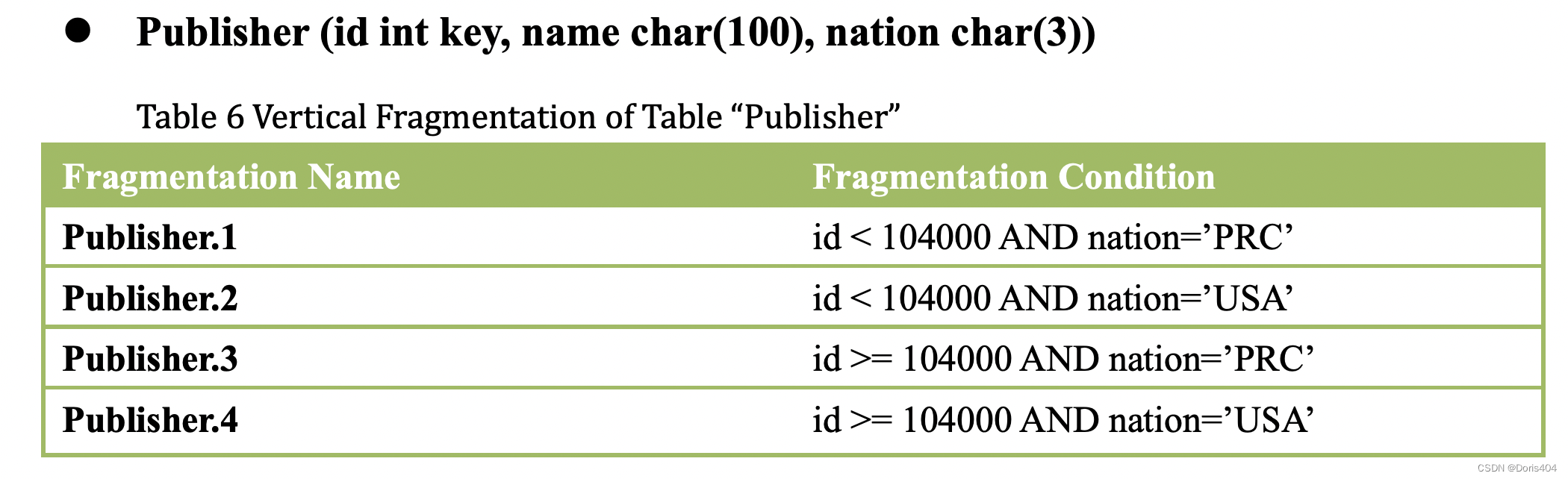
- consistency
select * from table Publisher where id>105000 AND nation='PRC';- id > 105000 --> Publisher3 Publisher4
- nation=‘PRC’ --> Publisher1 Publisher3
- id > 105000 + nation=‘PRC’ --> Publisher 3
- store fragment info + every state has the same fragment info
Tutorial for etcd
Network setting
- firewall + iptables + SELINUX (ps: if you fail you must do sth wrong here)
see blog
see blogufw status ufw inactive
see blogiptables -P INPUT ACCEPT iptables -P OUTPUT ACCEPTvim /etc/selinux/config # SELINUX=disabled reboot
Start etcd
- install etcd from web, run
bash install_etcd.sh - init cluster on all states, run the following cmd on different state
# machine-1
TOKEN=token-01
CLUSTER_STATE=new
NAME_1=machine-1
NAME_2=machine-2
NAME_3=machine-3
HOST_1=149.28.24.5
HOST_2=45.76.209.152
HOST_3=198.13.34.197
CLUSTER=${NAME_1}=http://${HOST_1}:2380,${NAME_2}=http://${HOST_2}:2380,${NAME_3}=http://${HOST_3}:2380

THIS_NAME=${NAME_1}
THIS_IP=${HOST_1}
etcd --data-dir=data.etcd --name ${THIS_NAME}
    --initial-advertise-peer-urls http://${THIS_IP}:2380 --listen-peer-urls http://${THIS_IP}:2380
    --advertise-client-urls http://${THIS_IP}:2379 --listen-client-urls http://${THIS_IP}:2379
    --initial-cluster ${CLUSTER}
    --initial-cluster-state ${CLUSTER_STATE} --initial-cluster-token ${TOKEN}
# machine-2 TOKEN=token-01 CLUSTER_STATE=new NAME_1=machine-1 NAME_2=machine-2 NAME_3=machine-3 HOST_1=149.28.24.5 HOST_2=45.76.209.152 HOST_3=198.13.34.197 CLUSTER=${NAME_1}=http://${HOST_1}:2380,${NAME_2}=http://${HOST_2}:2380,${NAME_3}=http://${HOST_3}:2380 THIS_NAME=${NAME_2} THIS_IP=${HOST_2} etcd --data-dir=data.etcd --name ${THIS_NAME} --initial-advertise-peer-urls http://${THIS_IP}:2380 --listen-peer-urls http://${THIS_IP}:2380 --advertise-client-urls http://${THIS_IP}:2379 --listen-client-urls http://${THIS_IP}:2379 --initial-cluster ${CLUSTER} --initial-cluster-state ${CLUSTER_STATE} --initial-cluster-token ${TOKEN}# machine-3 TOKEN=token-01 CLUSTER_STATE=new NAME_1=machine-1 NAME_2=machine-2 NAME_3=machine-3 HOST_1=149.28.24.5 HOST_2=45.76.209.152 HOST_3=198.13.34.197 CLUSTER=${NAME_1}=http://${HOST_1}:2380,${NAME_2}=http://${HOST_2}:2380,${NAME_3}=http://${HOST_3}:2380 THIS_NAME=${NAME_3} THIS_IP=${HOST_3} etcd --data-dir=data.etcd --name ${THIS_NAME} --initial-advertise-peer-urls http://${THIS_IP}:2380 --listen-peer-urls http://${THIS_IP}:2380 --advertise-client-urls http://${THIS_IP}:2379 --listen-client-urls http://${THIS_IP}:2379 --initial-cluster ${CLUSTER} --initial-cluster-state ${CLUSTER_STATE} --initial-cluster-token ${TOKEN}
Use etcd
- before use etcd
export ETCDCTL_API=3 HOST_1=149.28.24.5 HOST_2=45.76.209.152 HOST_3=198.13.34.197 ENDPOINTS=$HOST_1:2379,$HOST_2:2379,$HOST_3:2379 - status of etcd
etcdctl --endpoints=$ENDPOINTS member list # 714a089460a94bbe, started, machine-1, http://149.28.24.5:2380, http://149.28.24.5:2379, false # 7f9fd108bb5fe996, started, machine-2, http://45.76.209.152:2380, http://45.76.209.152:2379, false # 9a5cfb83fcf2f119, started, machine-3, http://198.13.34.197:2380, http://198.13.34.197:2379, false - get and put
etcdctl --endpoints=$ENDPOINTS put greeting hello
# OK
etcdctl --endpoints=$ENDPOINTS get greeting
# greeting
# hello
Error Log
- etcdmain: listen tcp 45.76.175.78:2382: bind: cannot assign requested address --> see config for port
- {“level”:“warn”,“ts”:“2022-11-12T05:51:16.901Z”,“caller”:“rafthttp/probing_status.go:68”,“msg”:“prober detected unhealthy status”,“round-tripper-name”:“ROUND_TRIPPER_RAFT_MESSAGE”,“remote-peer-id”:“9a5cfb83fcf2f119”,“rtt”:“0s”,“error”:“dial tcp 198.13.34.197:2380: i/o timeout”} --> network setting
- {“level”:“warn”,“ts”:“2022-11-13T02:31:09.486Z”,“caller”:“rafthttp/probing_status.go:68”,“msg”:“prober detected unhealthy status”,“round-tripper-name”:“ROUND_TRIPPER_RAFT_MESSAGE”,“remote-peer-id”:“7f9fd108bb5fe996”,“rtt”:“2.20087ms”,“error”:“dial tcp 45.76.209.152:2380: connect: no route to host”} --> network setting
Talk about raft
- paper see raft paper
- Intuitive understanding of raft protocol
Ref
- 2021 Fall Tutorial for etcd
- etcd doc
- download etcd from
- raft paper
- Intuitive understanding of raft protocol
- create new usr on Ubuntu
# create new usr
sudo useradd -d /home/usr -m usr
sudo usermod -s /bin/bash usr
sudo passwd usr
# passwd
最后
以上就是霸气白猫最近收集整理的关于etcd使用与原理【22Fa】Etcd Tutorial的全部内容,更多相关etcd使用与原理【22Fa】Etcd内容请搜索靠谱客的其他文章。
本图文内容来源于网友提供,作为学习参考使用,或来自网络收集整理,版权属于原作者所有。








发表评论 取消回复